From Surf Wiki (app.surf) — the open knowledge base
XBLite
| Field | Value |
|---|---|
| name | XBLite Summary |
| paradigm | Procedural |
| year | |
| designer | David Szafranski |
| developer | David Szafranski |
| latest_release_version | v2.4.3 |
| latest_release_date | |
| typing | Static |
| memory management | Auto memory management and garbage collection |
| influenced_by | XBasic, QuickBASIC |
| operating_system | Microsoft Windows |
| license | GNU GPL, Standard libraries licensed under the GNU LGPL |
| website |
XBLite is a free open-source BASIC programming language compiler and development system. It was started in 2001 by David Szafranski in order to provide a Windows exclusive version of the XBasic dialect. XBLite is released under the GNU GPL licensing scheme, Standard libraries are released under the GNU LGPL licensing scheme.
The XBLite syntax is very similar to that of XBasic and somewhat similar to Microsoft's QuickBASIC in that it is a procedural language capable of subs and functions. XBLite also has 64 bit integer data type, User Defined Types and the ability to have multiple modules in order to create GUI applications or games.
XBLite History
XBLite is a project that was started back in 2001. The main idea was to create a language that was based on the XBasic project that was to be exclusively a Microsoft Windows only programming language and environment. The first official release (version 1.0.0) was announced in October 2002, and subsequent versions were spread out amongst the last 6 years of development. Each release boasted both bug fixes and new features (to either the language itself and/or the different tools that are available with the XBLite project).
Today, version 2.4.0 is the current release of the compiler and version 1.30 of XSEd (The code editor). One of the latest projects is a visual GUI designer called viXen.
XBLite Development Specific Events
- A project called xpeeper is currently being developed by the XBLite team. This aims to give Peephole optimization technology to the XBLite project. The project has been distributed with XBLite since XBLite version 2.3.0. As well, XBLite is itself written in XBLite, making it a self hosting compiler (it can compile itself). Since version 2.1.0, XBLite incorporates the M4 preprocessor tool.
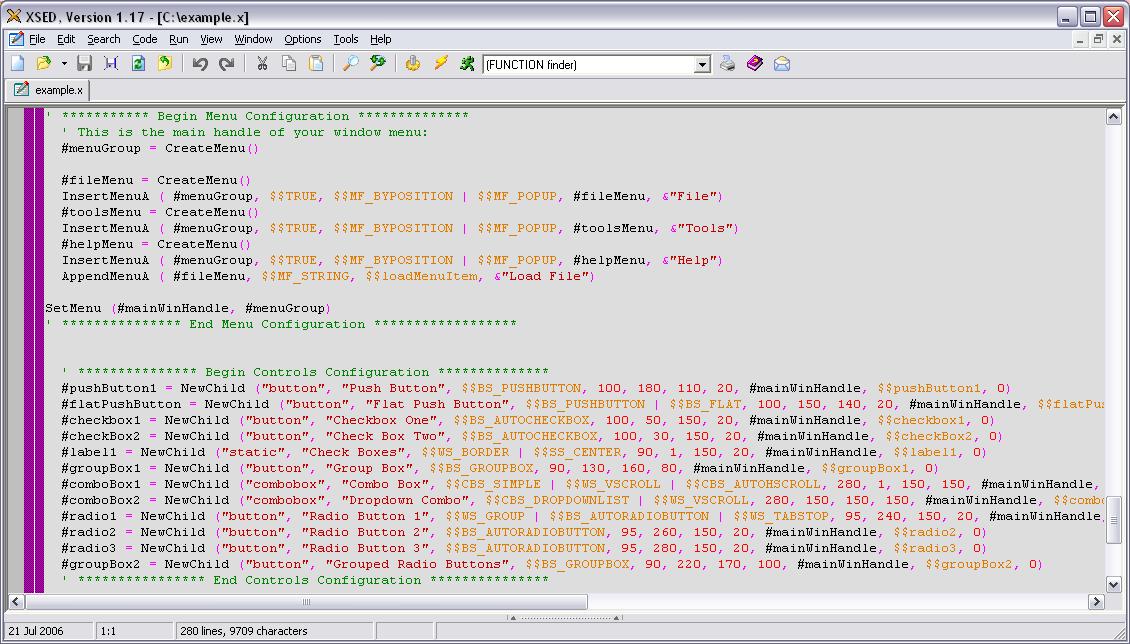
- XSEd, the code editor available with XBLite was developed in XBLite. It is based on the Scintilla project, a widely used editing component. XSEd is a full featured editor that allows users to work with XBLite source code modules and allows them to compile the code right from the editor.
- Open-source project, viXen was originally created by John "prujohn" Evans, who released version 0.50a on July 22, 2006. It is a WYSIWYG screen designer and an XBLite generator: viXen allows users to prototype a Windows GUI application before coding in XBLite the actual functions inside the generated skeleton. Currently, Guy Lonné develops and maintains the viXen project at SourceForge.
- XBLite working with the native Windows API, Callum Lowcay started the WinX project. It is a GUI library (WinX.dll) written in XBLite that "wraps" many of the most useful WinAPI calls. WinX simplifies coding Windows GUI applications in XBLite by providing an interface to the Windows widgets. WinX's applications can be first prototyped using viXen by just selecting the generation switch "Use WinX" prior the generation of the source code.
Components
XBLite comes with a complete set of components.
- Compiler (can make executable files, libraries and dynamic linked libraries (DLL) files)
- Scintilla Code Editor XSEd
- Resource Compiler
- Peephole optimizer xpeeper
- Graphical user interface builder viXen (Beta stage but very usable)
- GUI library WinX
Sample Code
Here is a classic example as it might be coded in XBLite.
- Hello world program in XBLite, console mode PROGRAM "hello" CONSOLE DECLARE FUNCTION Entry () FUNCTION Entry () a$ = INLINE$ ("Hello World!\n\n\n Press Enter to quit ") END FUNCTION END PROGRAM
- Hello world program in XBLite, Windows GUI mode PROGRAM "sayhello" ' interfaces to system DLLs IMPORT "gdi32" ' importing interface to gdi32.dll IMPORT "user32" ' importing interface to user32.dll DECLARE FUNCTION Entry () ' declare function Entry()
FUNCTION Entry () ' define (instantiate) function Entry() ' display a message box and wait until the user clicks the 'OK!' button MessageBoxA (0, &"Hello world!", &"Windows GUI Version", $$MB_OK) END FUNCTION END PROGRAM
References
- PCOPY! Covering All The BASICs
- PCOPY! Issue #70 , June 3, 2008, The DEF Of XBLite, Guy Lonné.
- PCOPY! Issue #60, January 8, 2008, An Xblite Primer, Guy Lonné.
- PCOPY! Issue #60, January 8, 2008, The ABC OF XBLite, Guy Lonné.
- GMTech Magazine
- Issue 5 Issue 5, May 2007, page 22 A Review Of XBLite
- BASIC Programming
- XBasic The Wikipedia on XBasic
This article was imported from Wikipedia and is available under the Creative Commons Attribution-ShareAlike 4.0 License. Content has been adapted to SurfDoc format. Original contributors can be found on the article history page.
Ask Mako anything about XBLite — get instant answers, deeper analysis, and related topics.
Research with MakoFree with your Surf account
Create a free account to save articles, ask Mako questions, and organize your research.
Sign up freeThis content may have been generated or modified by AI. CloudSurf Software LLC is not responsible for the accuracy, completeness, or reliability of AI-generated content. Always verify important information from primary sources.
Report