From Surf Wiki (app.surf) — the open knowledge base
Panel (computer software)
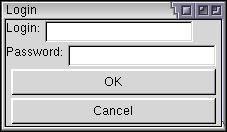
A panel is "a particular arrangement of information grouped together for presentation to users in a window or pop-up". In ISPF, a panel is "a predefined display image that you see on a display screen". In modern multiple-document interface software a panel refers to a particular arrangement of information grouped together and presented to users docked (by default) in the user interface rather than floating in a window, pop-up or dialog box.
A panel graphical control element is commonly packaged as part of a widget toolkit (libraries that contain a collection of graphical control elements) for a graphical user interface. See toolbar and dialog box.
References
References
- IBM Corporation. (1992). "CUA Basic Interface Design Guide".
- IBM Corporation. (2011). "Interactive System Productivity Facility (ISPF) User's Guide Volume I".
This article was imported from Wikipedia and is available under the Creative Commons Attribution-ShareAlike 4.0 License. Content has been adapted to SurfDoc format. Original contributors can be found on the article history page.
Ask Mako anything about Panel (computer software) — get instant answers, deeper analysis, and related topics.
Research with MakoFree with your Surf account
Create a free account to save articles, ask Mako questions, and organize your research.
Sign up freeThis content may have been generated or modified by AI. CloudSurf Software LLC is not responsible for the accuracy, completeness, or reliability of AI-generated content. Always verify important information from primary sources.
Report