From Surf Wiki (app.surf) — the open knowledge base
KDE Software Compilation 4
2008 software
2008 software
| Field | Value | |
|---|---|---|
| name | KDE Software Compilation 4 | |
| logo | KDE Oxygen logo.svg | |
| screenshot | [[File:KDE 4.png | 300px]] |
| caption | KDE Plasma Desktop 4.10 | |
| developer | KDE | |
| released | ||
| programming language | [C++](c) (Qt 4) | |
| operating system | Whole desktop: Unix-like with X11 and also Windows XP–7. | |
| Applications only: Mac OS X v10.4–10.6 | ||
| language | Multilingual | |
| discontinued | yes | |
| genre | Desktop environment | |
| license | GPL, LGPL, BSD license, MIT license and X11 license | |
| website |
Applications only: Mac OS X v10.4–10.6 KDE Software Compilation 4 (KDE SC 4) was the only series of the so-called KDE Software Compilation (KDE SC), first released in January 2008. The final release was version 4.14.3 in November 2014. It was the follow-up to K Desktop Environment 3. Following KDE SC 4, the compilation was broken up into basic framework libraries, desktop environment, and applications, which are termed KDE Frameworks 5, KDE Plasma 5, and KDE Applications, respectively. Major releases (4.x) were released every six months, while minor bugfix releases (4.x.y) were released monthly.
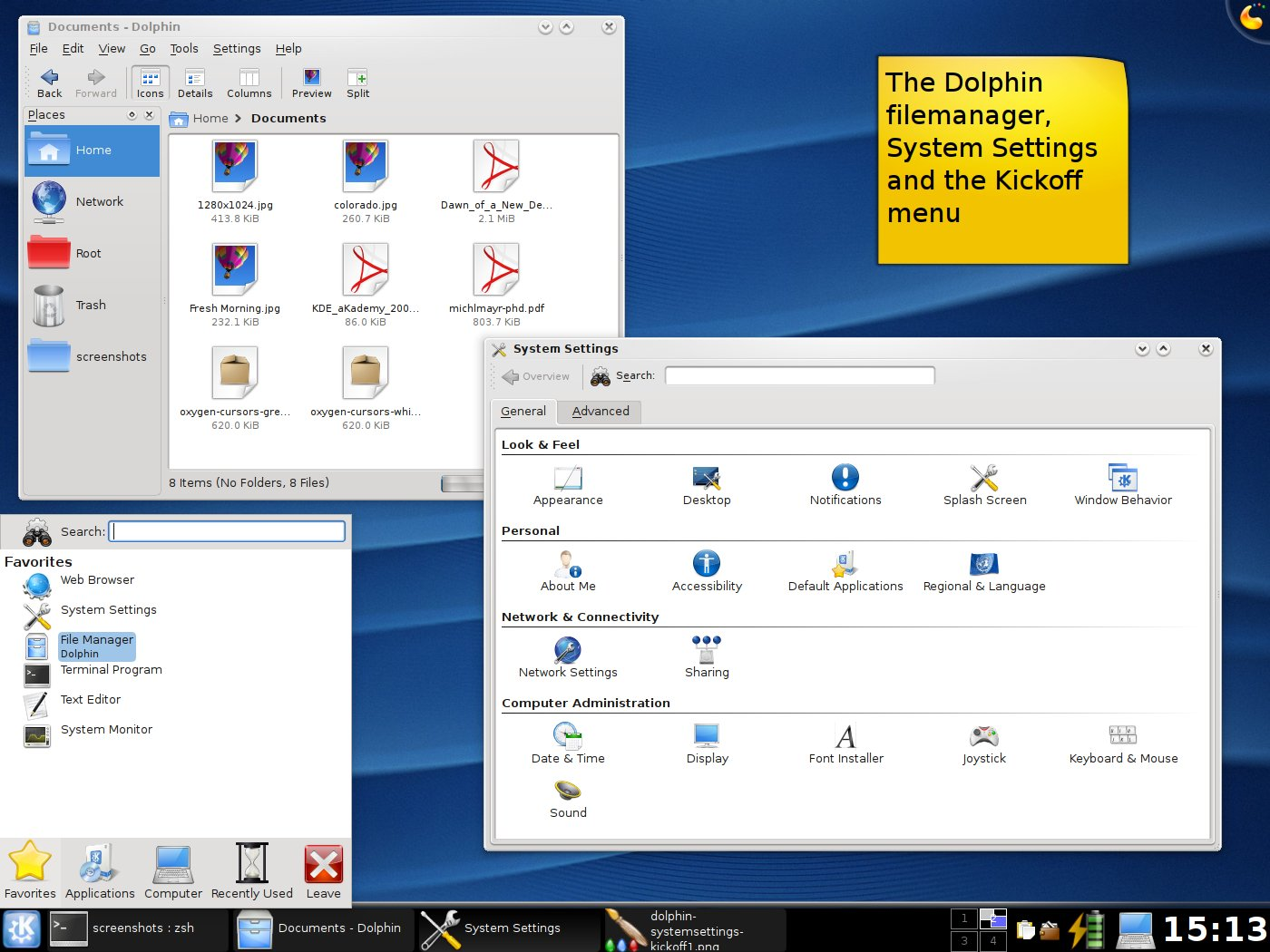
The series included updates to several of the KDE Platform's core components, notably a port to Qt 4. It contained a new multimedia API called Phonon, a device integration framework called Solid, and a new style guide and default icon set called Oxygen. It also included a new, unified desktop and panel user interface called Plasma, which supported desktop widgets, replacing K Desktop Environment 3's separate components.
One of the overall goals of KDE Platform 4 was to make it easy for KDE applications to be portable to different operating systems. This was made possible by the port to Qt 4, which facilitated support for non-X11-based platforms, including Microsoft Windows and Mac OS X. Versions 4.0 to 4.3 of KDE Software Compilation were known simply as KDE 4 – the name change being a result of the KDE project's re-branding to reflect KDE's increased scope.
Major updates
This is a short overview of major changes in KDE Software Compilation 4.
General
The port to the Qt 4 series was expected to enable KDE 4 to use less memory and be noticeably faster than KDE 3. The KDE libraries themselves have also been made more efficient. However, tests reveal that KDE 4.4 has the highest memory utilization on default Ubuntu installations when compared to GNOME 2.29, Xfce 4.6, and LXDE 0.5. Qt 4 is available under the LGPL for Mac OS X and Windows, which allows KDE 4 to run on those platforms. The ports to both platforms are in an early state. , KDE Software compilation 4 on Mac OS X is considered beta, while on Windows it is not in the final state, so applications can be unsuitable for day to day use yet. Both ports are trying to use as little divergent code as possible to make the applications function almost identically on all platforms. During Summer of Code 2007 an icon cache was created to decrease application start-up times for use in KDE 4. Improvements were varied – Kfind, an application which used several hundred icons, started up in about a quarter of the time it took previously. Other applications and a full KDE session started up a little over a second faster.
Many applications in the Extragear and KOffice modules have received numerous improvements with the new features of KDE 4 and Qt 4. But since they follow their own release schedule, they were not all available at the time of the first KDE 4 release – these include Amarok, K3b, digiKam, KWord, and Krita.
Visual
The most noticeable changes for users are the new icons, theme and sounds provided by the Oxygen Project. These represent a break from previous KDE icons and graphics, which had a cartoonish look. Instead Oxygen icons opt for a more photorealistic style. The Oxygen Project builds on the freedesktop.org Icon Naming Specification and Icon Theme Specification, allowing consistency across applications. The Oxygen team uses community help for better visuals in KDE 4, with both alternate icon sets and the winners of a wallpaper contest held by the Oxygen project being included in KDE 4. There is also a new set of human interface guidelines for a more standardized layout.
Plasma provides the main desktop user interface and is a rewrite of several core KDE applications, like the desktop drawing and most notably the widget engine. Plasma allows a more customisable desktop and more versatile widgets.
KWin, the KDE Window Manager, now provides its own compositing effects, similar to Compiz.
Development
Phonon is the name of the multimedia API in KDE 4. Phonon is a different approach to multimedia backends than in previous versions of KDE. This is because Phonon only functions as a wrapper, abstracting the various multimedia frameworks available for Unix-like operating systems into runtime switchable backends that can be accessed through a single API. This was done to provide a stable API for KDE 4 and to prevent it from depending on a single multimedia framework. Applications that use the Phonon API can be switched between multimedia frameworks seamlessly by simply changing the backend used in System Settings. Nokia adopted Phonon for multimedia use in Qt 4.4 and are developing backends for Gstreamer, Windows and OS X in the KDE SVN repository under the LGPL.
Solid is the hardware API in KDE 4. It functions similarly to Phonon as it does not manage hardware on its own but makes existing solutions accessible through a single API. The current solution uses HAL, NetworkManager and BlueZ (the official Linux bluetooth stack), but any and all parts can be replaced without breaking the application, making applications using Solid extremely flexible and portable.
ThreadWeaver is a programming library to help applications take advantage of multicore processors and is included with kdelibs.
Kross is the new scripting framework for KDE 4. Kross itself is not a scripting language, but makes it easier for developers to add support for other scripting languages. Once an application adds support for Kross, any language Kross supports can be used by developers. New scripting languages can be added by creating a plugin for Kross, which benefits all applications using it.
Decibel is a Telepathy-based communication framework, which was expected to be fully used by Kopete by KDE 4.2, but which is reported to be postponed indefinitely. Strigi is the default search tool for KDE 4, chosen for its speed and few dependencies. In concert with other software like Soprano, an RDF storage framework, and the NEPOMUK specification, Strigi will provide the beginnings of a semantic desktop in KDE 4. Users can tag files with additional information through Dolphin, which Strigi can index for more accurate searches.
KDE 4 uses CMake for its build system. Since previous versions of KDE were only on Unix systems, autotools were used, but a new build system was needed for builds on operating systems like Windows. CMake also dramatically simplified the build process. The autotools build system had become so complicated by KDE 3 that few developers understood it, requiring hours of work for simple changes. In early 2007 CMake was shown to compile KDE 4 version of KDElibs 40 % faster than the autotools compiled KDE 3 version.
DXS, previously known as GHNS (Get Hot New Stuff) and now adopted by freedesktop.org, is a web service that lets applications download and install data from the Internet with one click. It was used in the KDE 3 series but has been extended for use throughout KDE 4. One example was Kstars, that can use Astronomical data that is free for personal use but cannot be redistributed. DXS allows that data to be easily downloaded and installed from within the application instead of manually downloading it.
Akonadi is a new PIM framework for KDE 4. Akonadi is a unification of previously separate KDE PIM components. In the past each application would have its own method for storing information and handling data. Akonadi itself functions as a server that provides data and search functions to PIM applications. It is also able to update the status of contacts. So if one application changes information about a contact, all other applications are immediately informed of the change.
Released versions
KDE 4.0
The majority of development went into implementing most of the new technologies and frameworks of KDE 4. Plasma and the Oxygen style were two of the biggest user-facing changes.
Dolphin replaces Konqueror as the default file manager in KDE 4.0. This was done to address complaints of Konqueror being too complicated for a simple file manager. However Dolphin and Konqueror will share as much code as possible, and Dolphin can be embedded in Konqueror to allow Konqueror to still be used as a file manager.
Okular replaces several document viewers used in KDE 3, like KPDF, KGhostView and KDVI. Okular makes use of software libraries and can be extended to view almost any kind of document. Like Konqueror and KPDF in KDE 3, Okular can be embedded in other applications.
Pre-releases
On 11 May 2007, KDE 4.0 Alpha 1 was released marking the end of the addition of large features to KDE base libraries and shifting the focus onto integrating the new technologies into applications and the basic desktop. Alpha 1 included new frameworks to build applications with, providing improved hardware and multimedia integration through Solid and Phonon. Dolphin and Okular were integrated and a new visual appearance was provided through Oxygen icons.
On 4 July 2007, Alpha 2 was released. The release focused on integrating the Plasma desktop, improving functionality and stabilizing KDE.
On 2 August 2007, Beta 1 was released. Major features included a pixmap cache – speeding up icon loading, KDE PIM improvements, improved KWin effects and configuration, better interaction between Konqueror and Dolphin and Metalink support added to KGet for improved downloads.
On 6 September 2007, Beta 2 was released with improved BSD and Solaris support. The release included the addition of the Blitz graphic library – allowing for developers to use high performance graphical tricks like icon animation – and an overhaul of KRDC (K Remote Desktop Client) for Google's Summer of Code. Plasma was also integrated with Amarok to provide Amarok's central context view.
On 16 October 2007, Beta 3 was released. The beta 3 release was focused on stabilizing and finishing the design of libraries for the release of KDE Development Platform. Plasma received many new features including an applet browser. The educational software received many improvements in Marble and Parley (formerly known as KVoctrain) with bugfixes in other applications. A program called Step, an interactive physics simulator, was produced as part of the Google Summer of Code.
On 30 October 2007, Beta 4 was released. A list of release blockers was compiled, listing issues that need to be resolved before KDE will start with the release candidate cycle for the desktop. The goals were to focus on stabilization and fixing the release blockers.
At the same time, the first release candidate of KDE 4.0 Development Platform was released. The development platform contains all the base libraries to develop KDE applications, including "high-level widget libraries, a network abstraction layer and various libraries for multimedia integration, hardware integration and transparent access to resources on the network."
On 20 November 2007, Release Candidate (RC) 1 was released. This release was called a "Release Candidate" despite Plasma requiring further work and not being ready for release. On 11 December 2007, RC2 was released. The codebase was declared feature-complete. Some work was still required to fix bugs, finish off artwork and smooth out the user experience.
Release
KDE 4 was released on 11 January 2008. Despite being labelled as a stable release, it was intended for early adopters. Continuing to use KDE 3.5 was suggested for users wanting a more stable, "feature complete" desktop.
Reception
The release of KDE 4.0 was met with a mixed reception. While early adopters were tolerant of the lack of finish for some of its new features, the release was widely criticized because of a lack of stability and its "beta" quality. Computerworld reporter Steven Vaughan-Nichols criticised KDE 4.0 and KDE 4.1 and called for a fork of KDE 3.5 by rebuilding it on top of Qt 4. The same reporter later praised KDE 4.3 and welcomed the KDE 3.5 continuation project Trinity. Although Linus Torvalds switched from GNOME to KDE in December 2005, he switched back to GNOME after Fedora replaced KDE 3.5 with 4.0. In an interview with Computerworld, he described KDE 4.0 as a "break everything" model and "half-baked" release, claiming that he{{cite web |access-date=24 August 2010 |archive-date=20 April 2010 |archive-url=https://web.archive.org/web/20100420211912/http://www.computerworld.com/s/article/9126619/Q_A_Linux_founder_Linus_Torvalds_talks_about_open_source_identity?taxonomyId=18&pageNumber=5 |url-status=dead Image:Kde4alpha1.png|KDE 4.0 Alpha 1, showing Dolphin and early Oxygen icons Image:Kde4Beta1.png|Beta 1, showing the run dialogue, Clock Plasma widget and Dolphin file manager Image:Kdebeta2 plasma.png|Beta 2, showing a number of Plasma widgets Image:KDE 4 beta 4.png|Beta 4, showing the new Kickoff menu Image:KDE 4.0RC2.png|RC2, showing Dolphin and Konqueror
KDE 4.1

KDE 4.1 was released on 29 July 2008. KDE 4.1 includes a shared emoticon theming system which is used in PIM and Kopete, and DXS, a service that lets applications download and install data from the Internet with one click. Also introduced are GStreamer, QuickTime 7, and DirectShow 9 Phonon backends. Plasma improvements include support for Qt 4 widgets and WebKit integration – allowing many Apple Dashboard widgets to be displayed. There will also be ports of some applications to Windows and Mac OS X.
New applications include:
- Dragon Player multimedia player (formerly Codeine)
- Kontact – with some Akonadi functionality
- Skanlite scanner application
- Step physics simulator
- Games – Kdiamond (a Bejeweled clone), Kollision, Kubrick, KsirK, KBreakout
Image:Krunner4 1 beta1.png|krunner in KDE 4.1 Beta 1. Image:Plasma-panelcontroller 4.1 beta 1.png|New panel configuration interface in Beta 1. Image:Kontact-calendar 4.1 Beta 1.png|Kontact in Beta 1. Image:Kwin-coverswitch4.1 beta 1.png|"CoverSwitch" effect. Image:Kdepim-4.1.png|Kontact Suite.
KDE 4.2
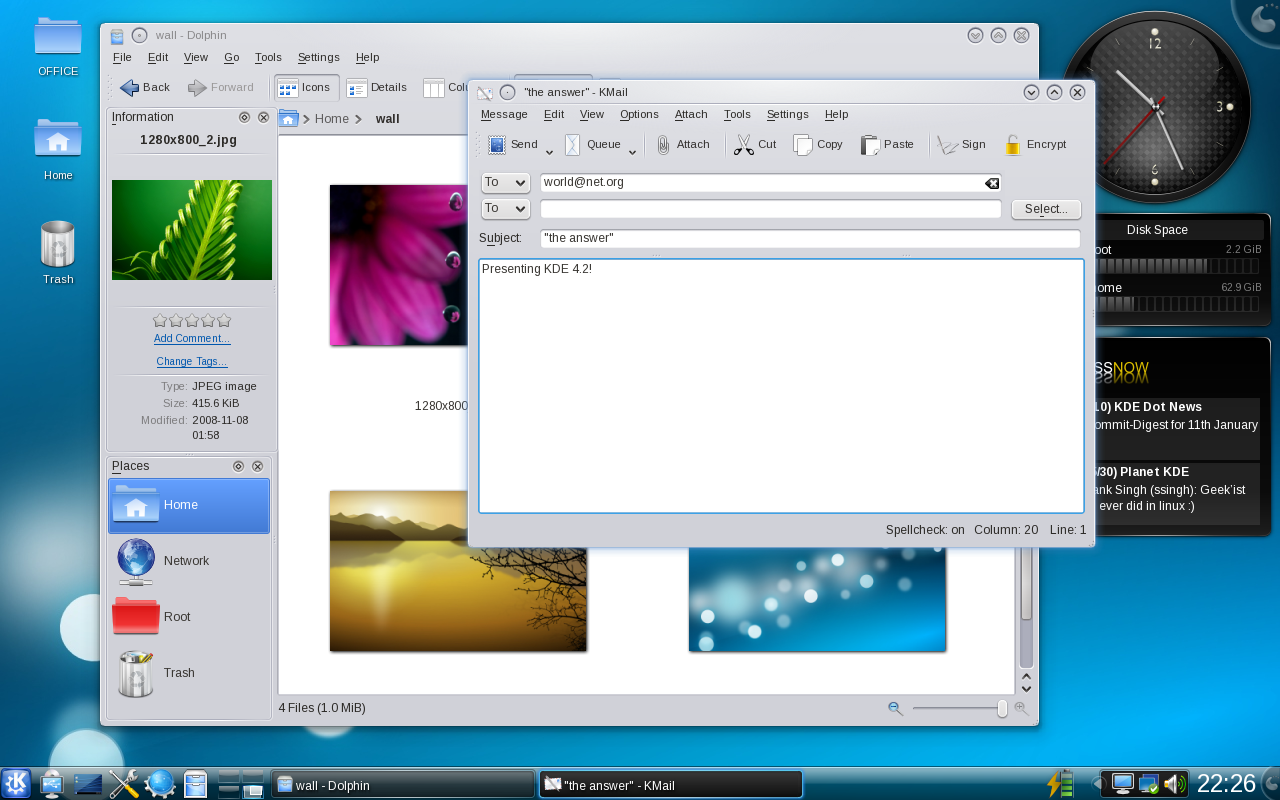
KDE 4.2 was released on 27 January 2009. The release is considered a significant improvement beyond KDE 4.1 in nearly all aspects, and a suitable replacement for KDE 3.5 for most users.
KDE Workspace improvements
The 4.2 release includes thousands of bug fixes and has implemented many features that were present in KDE 3.5 but had been missing in KDE 4.0 and 4.1. These include grouping and multiple row layout in the task bar, icon hiding in the system tray, panel autohiding, window previews and tooltips are back in the panel and task bar, notifications and job tracking by Plasma, and the ability to have icons on the desktop again by using a Folder View as the desktop background where icons now remain where they are placed.
New Plasma applets include applets for leaving messages on a locked screen, previewing files, switching desktop Activity, monitoring news feeds, and utilities like the pastebin applet, the calendar, timer, special character selector, a QuickLaunch widget, and a system monitor, among many others. The Plasma workspace can now load Google Gadgets. Plasma widgets can be written in Ruby and Python. Support for applets written in JavaScript and Mac OS X dashboard widgets has been further improved. Theming improvements in the Task Bar, Application Launcher, System Tray and most other Plasma components streamline the look and feel and increase consistency. A new System Settings module, Desktop Theme Details, gives the user control over each element of various Plasma themes. Wallpapers are now provided plugins, so developers can easily write custom wallpaper systems in KDE 4.2. Available wallpaper plugins in KDE 4.2 will be slideshows, Mandelbrot fractals, and regular static images.
New desktop effects have been added such as the Magic Lamp, Minimize effect and the Cube and Sphere desktop switchers. Others, such as the desktop grid, have been improved. The user interface for choosing effects has been reworked for easy selection of the most commonly used effects. Compositing desktop effects have been enabled by default where hardware and drivers support them. Automatic checks confirm that compositing works before enabling it on the workspace.
KRunner – the "Run command..." dialog – has extended functionality through several new plugins, including spellchecking, Konqueror browser history, power management control through PowerDevil, KDE Places, Recent Documents, and the ability to start specific sessions of the Kate editor, Konqueror and Konsole. The converter plugin now also supports quickly converting between units of speed, mass and distances.
Multi-screen support has been improved through the Kephal library, fixing many bugs when running KDE on more than one monitor.
New and improved applications
New applications include PowerDevil, a power management system for controlling various aspects of mobile devices. A new printing configuration system brings back a number of features users have been missing in KDE 4.0 and 4.1. The components "printer-applet" and "system-config-printer-kde" are shipped with the kdeadmin and kdeutils module. Killbots is a new game shipped with the kdegames module.
All applications have seen bugfixes, feature additions and user interface improvements. Dolphin now supports previews of files in toolbars and has gained a slider to zoom in and out on file item views. It can now also show the full path in the breadcrumb bar. Konqueror offers increased loading speed by prefetching domain name data in KHTML. A find-as-you-type bar improves navigation in webpages. KMail has a new message header list, and reworked attachment view. The KWrite and Kate text editors can now operate in Vi input mode, accommodating those used to the traditional UNIX editor. Ark, the archiving tool has gained support for password-protected archives and is accessible via a context menu from the file managers now. KRDC, the remote desktop client improves support for Microsoft's Active Directory through LDAP. Kontact has gained a new planner summary and support for drag and drop in the free/busy view. KSnapshot now uses the window title when saving screenshots, making it easier to index them using search engines.
Reception
The KDE 4.2 release "marks the end of the testing phase by being the first release ready for everyone – instead of just developers and enthusiasts" according to Thom Holwerda, a member of OSNews.
KDE 4.3

KDE 4.3 was released on 4 August 2009. Polishing KDE 4 was a focus of 4.3, with this release being described as incremental and lacking in major new features. KDE 4.3 fixed over 10,000 bugs and implemented almost 2,000 feature requests. Integration with other technologies, such as PolicyKit, NetworkManager & Geolocation services, was another focus of this release. KRunner's interface has been overhauled. A much more flexible system tray has been developed. Many new Plasmoids have been added, including the openDesktop.org Plasmoid – an initial take on the Social Desktop. Plasma also receives more keyboard shortcuts. File:Screenshot of KDE 4.3.png|The folder view widget's new "folder content tool tip" feature, the note taking widget, and Amarok 2.1's new Playlist Layout Editor. File:KDE 4.3 social desktop.png|KDE 4.3's social desktop and other online services. File:Krunner kde4.3.png|Krunner new interface.
KDE SC 4.4
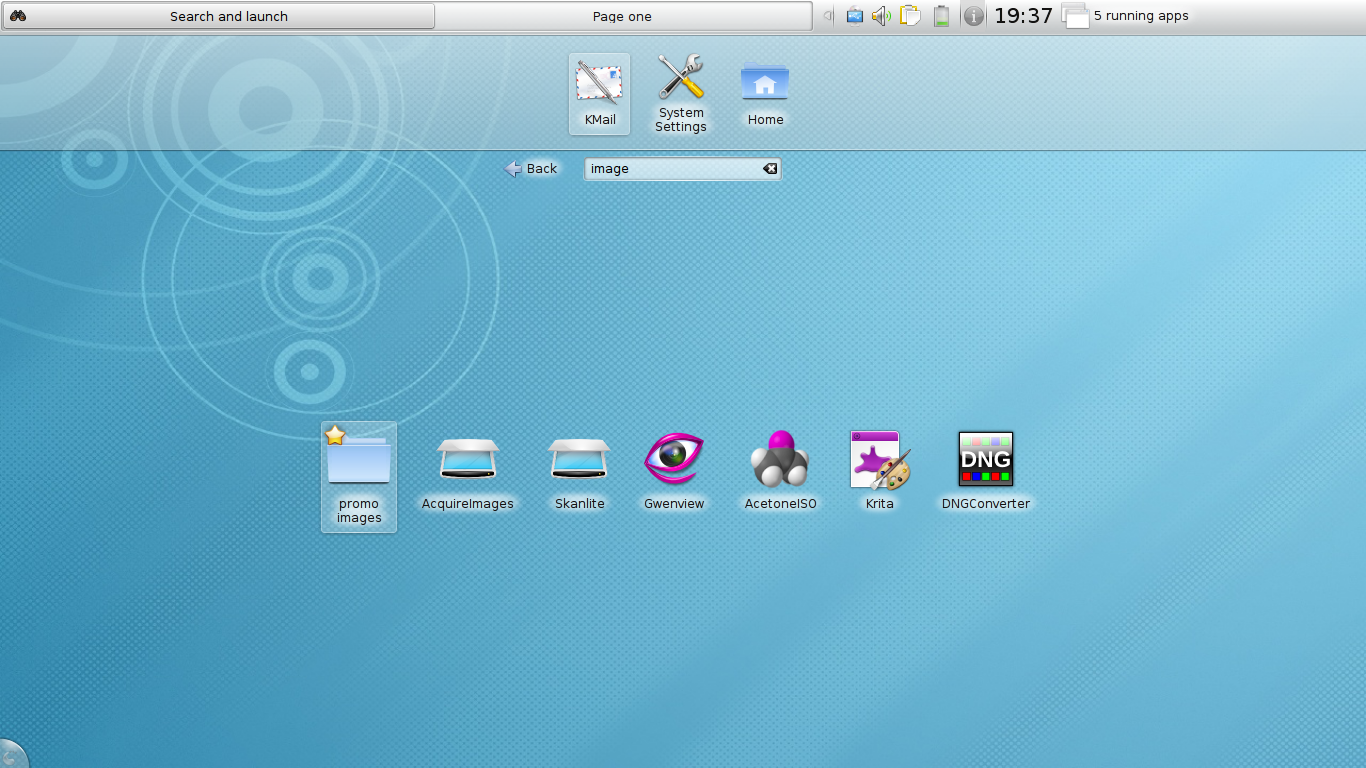
KDE SC 4.4 was released on 9 February 2010 and is based on version 4.6 of the Qt 4 toolkit. As such, KDE SC 4.4 carries Qt's performance improvements as well as Qt 4.6's new features, such as the new animation framework Kinetic.
KAddressBook Is replaced by a completely new application with the same name – previously tentatively called KContactManager. Key features of the new KAddressBook are Akonadi integration and a streamlined user interface.
Another major new feature is an additional new Plasma interface, targeted towards netbooks.
Kopete is released as version 1.0.
KAuth, a cross-platform authentication API, made its début in KDE SC 4.4. Initially only PolicyKit is supported as back-end.
KDE SC 4.5
KDE SC 4.5 was released on 10 August 2010. New features include the integration of the WebKit library, an open-source web browser engine, which is used in major browsers such as Apple Safari and Google Chrome. KDE's own KHTML engine will continue to be developed.
KPackage has been deprecated. KPackageKit was suggested to replace it but it didn't make it to replace it.
KDE SC 4.6
KDE SC 4.6 was released on 26 January 2011 and has better OpenGL compositing along with the usual myriad of fixes and features.
KDE SC 4.7
KDE SC 4.7 was released on 28 July 2011. This version updated KWin in order to be compatible with OpenGL ES 2.0, which will enhance its portability to mobile and tablet platforms. Other optimizations, such as the use of Qt Quick, were made in order to enhance this portability. This version also brought updates and enhancements to Plasma Desktop such as better network management and updates to certain widgets (like the Kickoff menu) as well as activities.
Aside from the desktop environment, version 4.7 updates many applications within the Software Compilation. Dolphin file manager has been updated to include a cleaner user interface. Marble, the virtual globe software, now supports voice navigation, a map creation wizard, as well as many new plugins. Gwenview image viewer now allows users to compare two or more photos side by side. The Kontact database has also been ported to Akonadi which allows the database to be easily accessible from other applications. Furthermore, the KMail database has also been ported to Akonadi. DigiKam has been updated to support face detection, image versioning, and image tagging. Other applications such as Kate, Kalzium, KAlgebra, KStars, and KDevelop have also been updated in this release. Moreover, version 4.7 fixed over 12,000 bugs.
KDE SC 4.8
Release 4.8 was made available on 25 January 2012.
Plasma Workspaces
KWin's rendering performance was increased by optimizing effect rendering. Window resizing was improved as well. Other KWin features are: QML based Window switcher (Tabbox), AnimationEffect class and initial Wayland support.
Applications
A new major version of Dolphin shipped with KDE Applications 4.8. It has improved performance, better file name display, animated transitions, and many other new and improved features.
Cantor shipped with additional back-ends based on Scilab and Qalculate.
KDE SC 4.9
KDE SC 4.9 was made available on 1 August 2012. The release featured several improvements to the Dolphin file manager, including the reintroduction of in-line file renaming, back and forward mouse buttons, improvement of the places panel and better usage of file metadata. Additionally, there were several improvements to KWin and Konsole. Activities were better integrated with the workspace. Several applications were updated, including Okular, Kopete, Kontact, and educational applications.
KDE SC 4.10
KDE SC 4.10 was released on 6 February 2013. Many of the default Plasma widgets were rewritten in QML, and Nepomuk, Kontact and Okular received significant speed improvements.
KDE SC 4.11
4.11 was released on 14 August 2013. Kontact and Nepomuk received many optimizations. The first generation Plasma Workspaces entered maintenance-only development mode.
KDE SC 4.12
KDE SC 4.12 was released on 18 December 2013. Kontact received substantial improvements.
KDE SC 4.13
KDE SC 4.13 was released on 16 April 2014. Nepomuk semantic desktop search was replaced with KDE's in house Baloo. KDE SC 4.13 was released in 53 different translations.
KDE SC 4.14
KDE SC 4.14 was released on 20 August 2014. The release primarily focused on stability, with numerous bugs fixed and few new features added. This was the final KDE SC 4 release.
Release schedule
| Date | Event | 4.0 | 2 April 2007 | 1 May 2007 | 11 May 2007 | 1 June 2007 | 4 July 2007 | 24 July 2007 | 2 August 2007 | 6 September 2007 | 18 October 2007 | 24 October 2007 | 30 October 2007 | 20 November 2007 | 11 December 2007 | 11 January 2008 | 4 June 2008 | 4.1 | 29 April 2008 | 19 May 2008 | 27 May 2008 | 24 June 2008 | 15 July 2008 | 29 July 2008 | 13 January 2009 | 4.2 | 17 November 2008 | 26 November 2008 | 18 December 2008 | 13 January 2009 | 27 January 2009 | 2 June 2009 | 4.3 | 4 May 2009 | 12 May 2009 | 9 June 2009 | 30 June 2009 | 9 July 2009 | 22 July 2009 | 4 August 2009 | 26 January 2010 | 4.4 | 25 November 2009 | 4 December 2009 | 21 December 2009 | 8 January 2010 | 25 January 2010 | 1 February 2010 | 9 February 2010 | 30 June 2010 | 4.5 | 11 May 2010 | 26 May 2010 | 9 June 2010 | 27 June 2010 | 8 July 2010 | 26 July 2010 | 10 August 2010 | 7 January 2011 | 4.6 | 11 November 2010 | 24 November 2010 | 8 December 2010 | 23 December 2010 | 5 January 2011 | 26 January 2011 | 5 July 2011 | 4.7 | 12 May 2011 | 25 May 2011 | 8 June 2011 | 22 June 2011 | 6 July 2011 | 27 July 2011 | 6 December 2011 | 4.8 | 10 November 2011 | 23 November 2011 | 7 December 2011 | 21 December 2011 | 4 January 2012 | 25 January 2012 | 6 August 2012 | 4.9 | 3 May 2012 | 30 May 2012 | 13 June 2012 | 27 June 2012 | 11 July 2012 | 1 August 2012 | 2 January 2013 | 4.10 | 25 October 2012 | 21 November 2012 | 5 December 2012 | 19 December 2012 | 4 January 2013 | 18 January 2013 | 6 February 2013 | 2 July 2013 | 4.11 | 22 May 2013 | 12 June 2013 | 26 June 2013 | 10 July 2013 | 24 July 2013 | 14 August 2013 | 7 January 2014 | 4.12 | 30 October 2013 | 6 November 2013 | 13 November 2013 | 20 November 2013 | 27 November 2013 | 18 December 2013 | 29 April 2014 | 4.13 | 26 February 2014 | 5 March 2014 | 12 March 2014 | 19 March 2014 | 26 March 2014 | 16 April 2014 | 15 July 2014 | 4.14 | 2 June 2014 | 9 July 2014 | 16 July 2014 | 23 July 2014 | 30 July 2014 | 20 August 2014 | 11 November 2014 | |||||||||||||||||||||||||||||||||||||||||||||||||||||||||||||||||||||||||||||||||||||||||||||||||||||||||||||||||||
|---|---|---|---|---|---|---|---|---|---|---|---|---|---|---|---|---|---|---|---|---|---|---|---|---|---|---|---|---|---|---|---|---|---|---|---|---|---|---|---|---|---|---|---|---|---|---|---|---|---|---|---|---|---|---|---|---|---|---|---|---|---|---|---|---|---|---|---|---|---|---|---|---|---|---|---|---|---|---|---|---|---|---|---|---|---|---|---|---|---|---|---|---|---|---|---|---|---|---|---|---|---|---|---|---|---|---|---|---|---|---|---|---|---|---|---|---|---|---|---|---|---|---|---|---|---|---|---|---|---|---|---|---|---|---|---|---|---|---|---|---|---|---|---|---|---|---|---|---|---|---|---|---|---|---|---|---|---|---|---|---|---|---|---|---|---|---|---|---|---|---|---|---|---|---|---|---|---|---|---|---|---|---|---|---|---|---|---|---|---|---|---|---|---|---|---|---|---|---|---|---|---|---|---|---|---|---|---|---|---|---|---|---|---|---|---|---|---|---|---|---|---|---|---|---|---|---|---|---|---|---|---|---|---|---|---|---|---|---|---|---|---|---|---|---|---|---|---|
| Subsystem Freeze | |||||||||||||||||||||||||||||||||||||||||||||||||||||||||||||||||||||||||||||||||||||||||||||||||||||||||||||||||||||||||||||||||||||||||||||||||||||||||||||||||||||||||||||||||||||||||||||||||||||||||||||||||||||||||||||||||||||||||||||||||||||||
| From this date forward, no new KDE subsystem or major changes can be committed to kdelibs. | |||||||||||||||||||||||||||||||||||||||||||||||||||||||||||||||||||||||||||||||||||||||||||||||||||||||||||||||||||||||||||||||||||||||||||||||||||||||||||||||||||||||||||||||||||||||||||||||||||||||||||||||||||||||||||||||||||||||||||||||||||||||
| kdelibs soft API Freeze | |||||||||||||||||||||||||||||||||||||||||||||||||||||||||||||||||||||||||||||||||||||||||||||||||||||||||||||||||||||||||||||||||||||||||||||||||||||||||||||||||||||||||||||||||||||||||||||||||||||||||||||||||||||||||||||||||||||||||||||||||||||||
| The kdelibs API is "soft-frozen", meaning that changes can be made with the consent of the core developers. | |||||||||||||||||||||||||||||||||||||||||||||||||||||||||||||||||||||||||||||||||||||||||||||||||||||||||||||||||||||||||||||||||||||||||||||||||||||||||||||||||||||||||||||||||||||||||||||||||||||||||||||||||||||||||||||||||||||||||||||||||||||||
| Alpha 1 | |||||||||||||||||||||||||||||||||||||||||||||||||||||||||||||||||||||||||||||||||||||||||||||||||||||||||||||||||||||||||||||||||||||||||||||||||||||||||||||||||||||||||||||||||||||||||||||||||||||||||||||||||||||||||||||||||||||||||||||||||||||||
| trunk/KDE is module frozen | |||||||||||||||||||||||||||||||||||||||||||||||||||||||||||||||||||||||||||||||||||||||||||||||||||||||||||||||||||||||||||||||||||||||||||||||||||||||||||||||||||||||||||||||||||||||||||||||||||||||||||||||||||||||||||||||||||||||||||||||||||||||
| Trunk is frozen for new or resurrected applications. | |||||||||||||||||||||||||||||||||||||||||||||||||||||||||||||||||||||||||||||||||||||||||||||||||||||||||||||||||||||||||||||||||||||||||||||||||||||||||||||||||||||||||||||||||||||||||||||||||||||||||||||||||||||||||||||||||||||||||||||||||||||||
| Alpha 2 | |||||||||||||||||||||||||||||||||||||||||||||||||||||||||||||||||||||||||||||||||||||||||||||||||||||||||||||||||||||||||||||||||||||||||||||||||||||||||||||||||||||||||||||||||||||||||||||||||||||||||||||||||||||||||||||||||||||||||||||||||||||||
| Initially due to be called Beta 1, it was decided to retain the alpha designation because this release was not judged to be beta quality. | |||||||||||||||||||||||||||||||||||||||||||||||||||||||||||||||||||||||||||||||||||||||||||||||||||||||||||||||||||||||||||||||||||||||||||||||||||||||||||||||||||||||||||||||||||||||||||||||||||||||||||||||||||||||||||||||||||||||||||||||||||||||
| Core Library API Freeze | |||||||||||||||||||||||||||||||||||||||||||||||||||||||||||||||||||||||||||||||||||||||||||||||||||||||||||||||||||||||||||||||||||||||||||||||||||||||||||||||||||||||||||||||||||||||||||||||||||||||||||||||||||||||||||||||||||||||||||||||||||||||
| Beta 1 | |||||||||||||||||||||||||||||||||||||||||||||||||||||||||||||||||||||||||||||||||||||||||||||||||||||||||||||||||||||||||||||||||||||||||||||||||||||||||||||||||||||||||||||||||||||||||||||||||||||||||||||||||||||||||||||||||||||||||||||||||||||||
| Beta 2 | |||||||||||||||||||||||||||||||||||||||||||||||||||||||||||||||||||||||||||||||||||||||||||||||||||||||||||||||||||||||||||||||||||||||||||||||||||||||||||||||||||||||||||||||||||||||||||||||||||||||||||||||||||||||||||||||||||||||||||||||||||||||
| Trunk is frozen for feature commits. | |||||||||||||||||||||||||||||||||||||||||||||||||||||||||||||||||||||||||||||||||||||||||||||||||||||||||||||||||||||||||||||||||||||||||||||||||||||||||||||||||||||||||||||||||||||||||||||||||||||||||||||||||||||||||||||||||||||||||||||||||||||||
| Beta 3 | |||||||||||||||||||||||||||||||||||||||||||||||||||||||||||||||||||||||||||||||||||||||||||||||||||||||||||||||||||||||||||||||||||||||||||||||||||||||||||||||||||||||||||||||||||||||||||||||||||||||||||||||||||||||||||||||||||||||||||||||||||||||
| KDE 4 Release Freeze | |||||||||||||||||||||||||||||||||||||||||||||||||||||||||||||||||||||||||||||||||||||||||||||||||||||||||||||||||||||||||||||||||||||||||||||||||||||||||||||||||||||||||||||||||||||||||||||||||||||||||||||||||||||||||||||||||||||||||||||||||||||||
| Source and binary compatibility until KDE 5, hard freeze Platform & soft freeze Desktop. | |||||||||||||||||||||||||||||||||||||||||||||||||||||||||||||||||||||||||||||||||||||||||||||||||||||||||||||||||||||||||||||||||||||||||||||||||||||||||||||||||||||||||||||||||||||||||||||||||||||||||||||||||||||||||||||||||||||||||||||||||||||||
| Beta 4 | |||||||||||||||||||||||||||||||||||||||||||||||||||||||||||||||||||||||||||||||||||||||||||||||||||||||||||||||||||||||||||||||||||||||||||||||||||||||||||||||||||||||||||||||||||||||||||||||||||||||||||||||||||||||||||||||||||||||||||||||||||||||
| Release candidate 1 | |||||||||||||||||||||||||||||||||||||||||||||||||||||||||||||||||||||||||||||||||||||||||||||||||||||||||||||||||||||||||||||||||||||||||||||||||||||||||||||||||||||||||||||||||||||||||||||||||||||||||||||||||||||||||||||||||||||||||||||||||||||||
| KDE Development Platform released | |||||||||||||||||||||||||||||||||||||||||||||||||||||||||||||||||||||||||||||||||||||||||||||||||||||||||||||||||||||||||||||||||||||||||||||||||||||||||||||||||||||||||||||||||||||||||||||||||||||||||||||||||||||||||||||||||||||||||||||||||||||||
| Release candidate 2 | |||||||||||||||||||||||||||||||||||||||||||||||||||||||||||||||||||||||||||||||||||||||||||||||||||||||||||||||||||||||||||||||||||||||||||||||||||||||||||||||||||||||||||||||||||||||||||||||||||||||||||||||||||||||||||||||||||||||||||||||||||||||
| Only regressions or serious bugs can be fixed. | |||||||||||||||||||||||||||||||||||||||||||||||||||||||||||||||||||||||||||||||||||||||||||||||||||||||||||||||||||||||||||||||||||||||||||||||||||||||||||||||||||||||||||||||||||||||||||||||||||||||||||||||||||||||||||||||||||||||||||||||||||||||
| **KDE 4.0 released** | |||||||||||||||||||||||||||||||||||||||||||||||||||||||||||||||||||||||||||||||||||||||||||||||||||||||||||||||||||||||||||||||||||||||||||||||||||||||||||||||||||||||||||||||||||||||||||||||||||||||||||||||||||||||||||||||||||||||||||||||||||||||
| 4.0.5 Maintenance release. Preceded by 4.0.1 to 4.0.4. | |||||||||||||||||||||||||||||||||||||||||||||||||||||||||||||||||||||||||||||||||||||||||||||||||||||||||||||||||||||||||||||||||||||||||||||||||||||||||||||||||||||||||||||||||||||||||||||||||||||||||||||||||||||||||||||||||||||||||||||||||||||||
| Alpha 1 | |||||||||||||||||||||||||||||||||||||||||||||||||||||||||||||||||||||||||||||||||||||||||||||||||||||||||||||||||||||||||||||||||||||||||||||||||||||||||||||||||||||||||||||||||||||||||||||||||||||||||||||||||||||||||||||||||||||||||||||||||||||||
| Feature Freeze | |||||||||||||||||||||||||||||||||||||||||||||||||||||||||||||||||||||||||||||||||||||||||||||||||||||||||||||||||||||||||||||||||||||||||||||||||||||||||||||||||||||||||||||||||||||||||||||||||||||||||||||||||||||||||||||||||||||||||||||||||||||||
| Beta 1 | |||||||||||||||||||||||||||||||||||||||||||||||||||||||||||||||||||||||||||||||||||||||||||||||||||||||||||||||||||||||||||||||||||||||||||||||||||||||||||||||||||||||||||||||||||||||||||||||||||||||||||||||||||||||||||||||||||||||||||||||||||||||
| Beta 2 | |||||||||||||||||||||||||||||||||||||||||||||||||||||||||||||||||||||||||||||||||||||||||||||||||||||||||||||||||||||||||||||||||||||||||||||||||||||||||||||||||||||||||||||||||||||||||||||||||||||||||||||||||||||||||||||||||||||||||||||||||||||||
| Release candidate 1 | |||||||||||||||||||||||||||||||||||||||||||||||||||||||||||||||||||||||||||||||||||||||||||||||||||||||||||||||||||||||||||||||||||||||||||||||||||||||||||||||||||||||||||||||||||||||||||||||||||||||||||||||||||||||||||||||||||||||||||||||||||||||
| **KDE 4.1 released** | |||||||||||||||||||||||||||||||||||||||||||||||||||||||||||||||||||||||||||||||||||||||||||||||||||||||||||||||||||||||||||||||||||||||||||||||||||||||||||||||||||||||||||||||||||||||||||||||||||||||||||||||||||||||||||||||||||||||||||||||||||||||
| 4.1.4 Maintenance release. Preceded by 4.1.1 to 4.1.3. | |||||||||||||||||||||||||||||||||||||||||||||||||||||||||||||||||||||||||||||||||||||||||||||||||||||||||||||||||||||||||||||||||||||||||||||||||||||||||||||||||||||||||||||||||||||||||||||||||||||||||||||||||||||||||||||||||||||||||||||||||||||||
| Feature Freeze | |||||||||||||||||||||||||||||||||||||||||||||||||||||||||||||||||||||||||||||||||||||||||||||||||||||||||||||||||||||||||||||||||||||||||||||||||||||||||||||||||||||||||||||||||||||||||||||||||||||||||||||||||||||||||||||||||||||||||||||||||||||||
| Beta 1 | |||||||||||||||||||||||||||||||||||||||||||||||||||||||||||||||||||||||||||||||||||||||||||||||||||||||||||||||||||||||||||||||||||||||||||||||||||||||||||||||||||||||||||||||||||||||||||||||||||||||||||||||||||||||||||||||||||||||||||||||||||||||
| Beta 2 | |||||||||||||||||||||||||||||||||||||||||||||||||||||||||||||||||||||||||||||||||||||||||||||||||||||||||||||||||||||||||||||||||||||||||||||||||||||||||||||||||||||||||||||||||||||||||||||||||||||||||||||||||||||||||||||||||||||||||||||||||||||||
| Release candidate 1 | |||||||||||||||||||||||||||||||||||||||||||||||||||||||||||||||||||||||||||||||||||||||||||||||||||||||||||||||||||||||||||||||||||||||||||||||||||||||||||||||||||||||||||||||||||||||||||||||||||||||||||||||||||||||||||||||||||||||||||||||||||||||
| **KDE 4.2 released** | |||||||||||||||||||||||||||||||||||||||||||||||||||||||||||||||||||||||||||||||||||||||||||||||||||||||||||||||||||||||||||||||||||||||||||||||||||||||||||||||||||||||||||||||||||||||||||||||||||||||||||||||||||||||||||||||||||||||||||||||||||||||
| 4.2.4 Maintenance release. Preceded by 4.2.1 to 4.2.3. | |||||||||||||||||||||||||||||||||||||||||||||||||||||||||||||||||||||||||||||||||||||||||||||||||||||||||||||||||||||||||||||||||||||||||||||||||||||||||||||||||||||||||||||||||||||||||||||||||||||||||||||||||||||||||||||||||||||||||||||||||||||||
| Feature Freeze | |||||||||||||||||||||||||||||||||||||||||||||||||||||||||||||||||||||||||||||||||||||||||||||||||||||||||||||||||||||||||||||||||||||||||||||||||||||||||||||||||||||||||||||||||||||||||||||||||||||||||||||||||||||||||||||||||||||||||||||||||||||||
| Beta 1 | |||||||||||||||||||||||||||||||||||||||||||||||||||||||||||||||||||||||||||||||||||||||||||||||||||||||||||||||||||||||||||||||||||||||||||||||||||||||||||||||||||||||||||||||||||||||||||||||||||||||||||||||||||||||||||||||||||||||||||||||||||||||
| Beta 2 | |||||||||||||||||||||||||||||||||||||||||||||||||||||||||||||||||||||||||||||||||||||||||||||||||||||||||||||||||||||||||||||||||||||||||||||||||||||||||||||||||||||||||||||||||||||||||||||||||||||||||||||||||||||||||||||||||||||||||||||||||||||||
| Release candidate 1 | |||||||||||||||||||||||||||||||||||||||||||||||||||||||||||||||||||||||||||||||||||||||||||||||||||||||||||||||||||||||||||||||||||||||||||||||||||||||||||||||||||||||||||||||||||||||||||||||||||||||||||||||||||||||||||||||||||||||||||||||||||||||
| Release candidate 2 | |||||||||||||||||||||||||||||||||||||||||||||||||||||||||||||||||||||||||||||||||||||||||||||||||||||||||||||||||||||||||||||||||||||||||||||||||||||||||||||||||||||||||||||||||||||||||||||||||||||||||||||||||||||||||||||||||||||||||||||||||||||||
| Release candidate 3 | |||||||||||||||||||||||||||||||||||||||||||||||||||||||||||||||||||||||||||||||||||||||||||||||||||||||||||||||||||||||||||||||||||||||||||||||||||||||||||||||||||||||||||||||||||||||||||||||||||||||||||||||||||||||||||||||||||||||||||||||||||||||
| **KDE 4.3 released** | |||||||||||||||||||||||||||||||||||||||||||||||||||||||||||||||||||||||||||||||||||||||||||||||||||||||||||||||||||||||||||||||||||||||||||||||||||||||||||||||||||||||||||||||||||||||||||||||||||||||||||||||||||||||||||||||||||||||||||||||||||||||
| 4.3.5 Maintenance release. Preceded by 4.3.1 to 4.3.4. | |||||||||||||||||||||||||||||||||||||||||||||||||||||||||||||||||||||||||||||||||||||||||||||||||||||||||||||||||||||||||||||||||||||||||||||||||||||||||||||||||||||||||||||||||||||||||||||||||||||||||||||||||||||||||||||||||||||||||||||||||||||||
| Feature Freeze | |||||||||||||||||||||||||||||||||||||||||||||||||||||||||||||||||||||||||||||||||||||||||||||||||||||||||||||||||||||||||||||||||||||||||||||||||||||||||||||||||||||||||||||||||||||||||||||||||||||||||||||||||||||||||||||||||||||||||||||||||||||||
| Beta 1 | |||||||||||||||||||||||||||||||||||||||||||||||||||||||||||||||||||||||||||||||||||||||||||||||||||||||||||||||||||||||||||||||||||||||||||||||||||||||||||||||||||||||||||||||||||||||||||||||||||||||||||||||||||||||||||||||||||||||||||||||||||||||
| Beta 2 | |||||||||||||||||||||||||||||||||||||||||||||||||||||||||||||||||||||||||||||||||||||||||||||||||||||||||||||||||||||||||||||||||||||||||||||||||||||||||||||||||||||||||||||||||||||||||||||||||||||||||||||||||||||||||||||||||||||||||||||||||||||||
| Release candidate 1 | |||||||||||||||||||||||||||||||||||||||||||||||||||||||||||||||||||||||||||||||||||||||||||||||||||||||||||||||||||||||||||||||||||||||||||||||||||||||||||||||||||||||||||||||||||||||||||||||||||||||||||||||||||||||||||||||||||||||||||||||||||||||
| Release candidate 2 | |||||||||||||||||||||||||||||||||||||||||||||||||||||||||||||||||||||||||||||||||||||||||||||||||||||||||||||||||||||||||||||||||||||||||||||||||||||||||||||||||||||||||||||||||||||||||||||||||||||||||||||||||||||||||||||||||||||||||||||||||||||||
| Release candidate 3 | |||||||||||||||||||||||||||||||||||||||||||||||||||||||||||||||||||||||||||||||||||||||||||||||||||||||||||||||||||||||||||||||||||||||||||||||||||||||||||||||||||||||||||||||||||||||||||||||||||||||||||||||||||||||||||||||||||||||||||||||||||||||
| **KDE SC 4.4 released** | |||||||||||||||||||||||||||||||||||||||||||||||||||||||||||||||||||||||||||||||||||||||||||||||||||||||||||||||||||||||||||||||||||||||||||||||||||||||||||||||||||||||||||||||||||||||||||||||||||||||||||||||||||||||||||||||||||||||||||||||||||||||
| 4.4.5 Maintenance release. Preceded by 4.4.1 to 4.4.4. | |||||||||||||||||||||||||||||||||||||||||||||||||||||||||||||||||||||||||||||||||||||||||||||||||||||||||||||||||||||||||||||||||||||||||||||||||||||||||||||||||||||||||||||||||||||||||||||||||||||||||||||||||||||||||||||||||||||||||||||||||||||||
| Feature Freeze | |||||||||||||||||||||||||||||||||||||||||||||||||||||||||||||||||||||||||||||||||||||||||||||||||||||||||||||||||||||||||||||||||||||||||||||||||||||||||||||||||||||||||||||||||||||||||||||||||||||||||||||||||||||||||||||||||||||||||||||||||||||||
| Beta 1 | |||||||||||||||||||||||||||||||||||||||||||||||||||||||||||||||||||||||||||||||||||||||||||||||||||||||||||||||||||||||||||||||||||||||||||||||||||||||||||||||||||||||||||||||||||||||||||||||||||||||||||||||||||||||||||||||||||||||||||||||||||||||
| Beta 2 | |||||||||||||||||||||||||||||||||||||||||||||||||||||||||||||||||||||||||||||||||||||||||||||||||||||||||||||||||||||||||||||||||||||||||||||||||||||||||||||||||||||||||||||||||||||||||||||||||||||||||||||||||||||||||||||||||||||||||||||||||||||||
| Release candidate 1 | |||||||||||||||||||||||||||||||||||||||||||||||||||||||||||||||||||||||||||||||||||||||||||||||||||||||||||||||||||||||||||||||||||||||||||||||||||||||||||||||||||||||||||||||||||||||||||||||||||||||||||||||||||||||||||||||||||||||||||||||||||||||
| Release candidate 2 | |||||||||||||||||||||||||||||||||||||||||||||||||||||||||||||||||||||||||||||||||||||||||||||||||||||||||||||||||||||||||||||||||||||||||||||||||||||||||||||||||||||||||||||||||||||||||||||||||||||||||||||||||||||||||||||||||||||||||||||||||||||||
| Release candidate 3 | |||||||||||||||||||||||||||||||||||||||||||||||||||||||||||||||||||||||||||||||||||||||||||||||||||||||||||||||||||||||||||||||||||||||||||||||||||||||||||||||||||||||||||||||||||||||||||||||||||||||||||||||||||||||||||||||||||||||||||||||||||||||
| **KDE SC 4.5 released** | |||||||||||||||||||||||||||||||||||||||||||||||||||||||||||||||||||||||||||||||||||||||||||||||||||||||||||||||||||||||||||||||||||||||||||||||||||||||||||||||||||||||||||||||||||||||||||||||||||||||||||||||||||||||||||||||||||||||||||||||||||||||
| 4.5.5 Maintenance release. Preceded by 4.5.1 to 4.5.4. | |||||||||||||||||||||||||||||||||||||||||||||||||||||||||||||||||||||||||||||||||||||||||||||||||||||||||||||||||||||||||||||||||||||||||||||||||||||||||||||||||||||||||||||||||||||||||||||||||||||||||||||||||||||||||||||||||||||||||||||||||||||||
| Feature Freeze | |||||||||||||||||||||||||||||||||||||||||||||||||||||||||||||||||||||||||||||||||||||||||||||||||||||||||||||||||||||||||||||||||||||||||||||||||||||||||||||||||||||||||||||||||||||||||||||||||||||||||||||||||||||||||||||||||||||||||||||||||||||||
| Beta 1 | |||||||||||||||||||||||||||||||||||||||||||||||||||||||||||||||||||||||||||||||||||||||||||||||||||||||||||||||||||||||||||||||||||||||||||||||||||||||||||||||||||||||||||||||||||||||||||||||||||||||||||||||||||||||||||||||||||||||||||||||||||||||
| Beta 2 | |||||||||||||||||||||||||||||||||||||||||||||||||||||||||||||||||||||||||||||||||||||||||||||||||||||||||||||||||||||||||||||||||||||||||||||||||||||||||||||||||||||||||||||||||||||||||||||||||||||||||||||||||||||||||||||||||||||||||||||||||||||||
| Release candidate 1 | |||||||||||||||||||||||||||||||||||||||||||||||||||||||||||||||||||||||||||||||||||||||||||||||||||||||||||||||||||||||||||||||||||||||||||||||||||||||||||||||||||||||||||||||||||||||||||||||||||||||||||||||||||||||||||||||||||||||||||||||||||||||
| Release candidate 2 | |||||||||||||||||||||||||||||||||||||||||||||||||||||||||||||||||||||||||||||||||||||||||||||||||||||||||||||||||||||||||||||||||||||||||||||||||||||||||||||||||||||||||||||||||||||||||||||||||||||||||||||||||||||||||||||||||||||||||||||||||||||||
| **KDE SC 4.6 released** | |||||||||||||||||||||||||||||||||||||||||||||||||||||||||||||||||||||||||||||||||||||||||||||||||||||||||||||||||||||||||||||||||||||||||||||||||||||||||||||||||||||||||||||||||||||||||||||||||||||||||||||||||||||||||||||||||||||||||||||||||||||||
| 4.6.5 Maintenance release. Preceded by 4.6.1 to 4.6.4. | |||||||||||||||||||||||||||||||||||||||||||||||||||||||||||||||||||||||||||||||||||||||||||||||||||||||||||||||||||||||||||||||||||||||||||||||||||||||||||||||||||||||||||||||||||||||||||||||||||||||||||||||||||||||||||||||||||||||||||||||||||||||
| Feature Freeze | |||||||||||||||||||||||||||||||||||||||||||||||||||||||||||||||||||||||||||||||||||||||||||||||||||||||||||||||||||||||||||||||||||||||||||||||||||||||||||||||||||||||||||||||||||||||||||||||||||||||||||||||||||||||||||||||||||||||||||||||||||||||
| Beta 1 | |||||||||||||||||||||||||||||||||||||||||||||||||||||||||||||||||||||||||||||||||||||||||||||||||||||||||||||||||||||||||||||||||||||||||||||||||||||||||||||||||||||||||||||||||||||||||||||||||||||||||||||||||||||||||||||||||||||||||||||||||||||||
| Beta 2 | |||||||||||||||||||||||||||||||||||||||||||||||||||||||||||||||||||||||||||||||||||||||||||||||||||||||||||||||||||||||||||||||||||||||||||||||||||||||||||||||||||||||||||||||||||||||||||||||||||||||||||||||||||||||||||||||||||||||||||||||||||||||
| Release candidate 1 | |||||||||||||||||||||||||||||||||||||||||||||||||||||||||||||||||||||||||||||||||||||||||||||||||||||||||||||||||||||||||||||||||||||||||||||||||||||||||||||||||||||||||||||||||||||||||||||||||||||||||||||||||||||||||||||||||||||||||||||||||||||||
| Release candidate 2 | |||||||||||||||||||||||||||||||||||||||||||||||||||||||||||||||||||||||||||||||||||||||||||||||||||||||||||||||||||||||||||||||||||||||||||||||||||||||||||||||||||||||||||||||||||||||||||||||||||||||||||||||||||||||||||||||||||||||||||||||||||||||
| **KDE SC 4.7 released** | |||||||||||||||||||||||||||||||||||||||||||||||||||||||||||||||||||||||||||||||||||||||||||||||||||||||||||||||||||||||||||||||||||||||||||||||||||||||||||||||||||||||||||||||||||||||||||||||||||||||||||||||||||||||||||||||||||||||||||||||||||||||
| 4.7.4 Maintenance Release. Preceded by 4.7.1 to 4.7.3. | |||||||||||||||||||||||||||||||||||||||||||||||||||||||||||||||||||||||||||||||||||||||||||||||||||||||||||||||||||||||||||||||||||||||||||||||||||||||||||||||||||||||||||||||||||||||||||||||||||||||||||||||||||||||||||||||||||||||||||||||||||||||
| Feature Freeze | |||||||||||||||||||||||||||||||||||||||||||||||||||||||||||||||||||||||||||||||||||||||||||||||||||||||||||||||||||||||||||||||||||||||||||||||||||||||||||||||||||||||||||||||||||||||||||||||||||||||||||||||||||||||||||||||||||||||||||||||||||||||
| Beta 1 | |||||||||||||||||||||||||||||||||||||||||||||||||||||||||||||||||||||||||||||||||||||||||||||||||||||||||||||||||||||||||||||||||||||||||||||||||||||||||||||||||||||||||||||||||||||||||||||||||||||||||||||||||||||||||||||||||||||||||||||||||||||||
| Beta 2 | |||||||||||||||||||||||||||||||||||||||||||||||||||||||||||||||||||||||||||||||||||||||||||||||||||||||||||||||||||||||||||||||||||||||||||||||||||||||||||||||||||||||||||||||||||||||||||||||||||||||||||||||||||||||||||||||||||||||||||||||||||||||
| Release candidate 1 | |||||||||||||||||||||||||||||||||||||||||||||||||||||||||||||||||||||||||||||||||||||||||||||||||||||||||||||||||||||||||||||||||||||||||||||||||||||||||||||||||||||||||||||||||||||||||||||||||||||||||||||||||||||||||||||||||||||||||||||||||||||||
| Release candidate 2 | |||||||||||||||||||||||||||||||||||||||||||||||||||||||||||||||||||||||||||||||||||||||||||||||||||||||||||||||||||||||||||||||||||||||||||||||||||||||||||||||||||||||||||||||||||||||||||||||||||||||||||||||||||||||||||||||||||||||||||||||||||||||
| **KDE SC 4.8 released** | |||||||||||||||||||||||||||||||||||||||||||||||||||||||||||||||||||||||||||||||||||||||||||||||||||||||||||||||||||||||||||||||||||||||||||||||||||||||||||||||||||||||||||||||||||||||||||||||||||||||||||||||||||||||||||||||||||||||||||||||||||||||
| 4.8.5 Maintenance Release. Preceded by 4.8.1 to 4.8.4. | |||||||||||||||||||||||||||||||||||||||||||||||||||||||||||||||||||||||||||||||||||||||||||||||||||||||||||||||||||||||||||||||||||||||||||||||||||||||||||||||||||||||||||||||||||||||||||||||||||||||||||||||||||||||||||||||||||||||||||||||||||||||
| Feature Freeze | |||||||||||||||||||||||||||||||||||||||||||||||||||||||||||||||||||||||||||||||||||||||||||||||||||||||||||||||||||||||||||||||||||||||||||||||||||||||||||||||||||||||||||||||||||||||||||||||||||||||||||||||||||||||||||||||||||||||||||||||||||||||
| Beta 1 | |||||||||||||||||||||||||||||||||||||||||||||||||||||||||||||||||||||||||||||||||||||||||||||||||||||||||||||||||||||||||||||||||||||||||||||||||||||||||||||||||||||||||||||||||||||||||||||||||||||||||||||||||||||||||||||||||||||||||||||||||||||||
| Beta 2 | |||||||||||||||||||||||||||||||||||||||||||||||||||||||||||||||||||||||||||||||||||||||||||||||||||||||||||||||||||||||||||||||||||||||||||||||||||||||||||||||||||||||||||||||||||||||||||||||||||||||||||||||||||||||||||||||||||||||||||||||||||||||
| Release candidate 1 | |||||||||||||||||||||||||||||||||||||||||||||||||||||||||||||||||||||||||||||||||||||||||||||||||||||||||||||||||||||||||||||||||||||||||||||||||||||||||||||||||||||||||||||||||||||||||||||||||||||||||||||||||||||||||||||||||||||||||||||||||||||||
| Release candidate 2 | |||||||||||||||||||||||||||||||||||||||||||||||||||||||||||||||||||||||||||||||||||||||||||||||||||||||||||||||||||||||||||||||||||||||||||||||||||||||||||||||||||||||||||||||||||||||||||||||||||||||||||||||||||||||||||||||||||||||||||||||||||||||
| **KDE SC 4.9 released** | |||||||||||||||||||||||||||||||||||||||||||||||||||||||||||||||||||||||||||||||||||||||||||||||||||||||||||||||||||||||||||||||||||||||||||||||||||||||||||||||||||||||||||||||||||||||||||||||||||||||||||||||||||||||||||||||||||||||||||||||||||||||
| 4.9.5 Maintenance Release. Preceded by 4.9.1 to 4.9.4. | |||||||||||||||||||||||||||||||||||||||||||||||||||||||||||||||||||||||||||||||||||||||||||||||||||||||||||||||||||||||||||||||||||||||||||||||||||||||||||||||||||||||||||||||||||||||||||||||||||||||||||||||||||||||||||||||||||||||||||||||||||||||
| Feature Freeze | |||||||||||||||||||||||||||||||||||||||||||||||||||||||||||||||||||||||||||||||||||||||||||||||||||||||||||||||||||||||||||||||||||||||||||||||||||||||||||||||||||||||||||||||||||||||||||||||||||||||||||||||||||||||||||||||||||||||||||||||||||||||
| Beta 1 | |||||||||||||||||||||||||||||||||||||||||||||||||||||||||||||||||||||||||||||||||||||||||||||||||||||||||||||||||||||||||||||||||||||||||||||||||||||||||||||||||||||||||||||||||||||||||||||||||||||||||||||||||||||||||||||||||||||||||||||||||||||||
| Beta 2 | |||||||||||||||||||||||||||||||||||||||||||||||||||||||||||||||||||||||||||||||||||||||||||||||||||||||||||||||||||||||||||||||||||||||||||||||||||||||||||||||||||||||||||||||||||||||||||||||||||||||||||||||||||||||||||||||||||||||||||||||||||||||
| Release candidate 1 | |||||||||||||||||||||||||||||||||||||||||||||||||||||||||||||||||||||||||||||||||||||||||||||||||||||||||||||||||||||||||||||||||||||||||||||||||||||||||||||||||||||||||||||||||||||||||||||||||||||||||||||||||||||||||||||||||||||||||||||||||||||||
| Release candidate 2 | |||||||||||||||||||||||||||||||||||||||||||||||||||||||||||||||||||||||||||||||||||||||||||||||||||||||||||||||||||||||||||||||||||||||||||||||||||||||||||||||||||||||||||||||||||||||||||||||||||||||||||||||||||||||||||||||||||||||||||||||||||||||
| Release candidate 3 | |||||||||||||||||||||||||||||||||||||||||||||||||||||||||||||||||||||||||||||||||||||||||||||||||||||||||||||||||||||||||||||||||||||||||||||||||||||||||||||||||||||||||||||||||||||||||||||||||||||||||||||||||||||||||||||||||||||||||||||||||||||||
| **KDE SC 4.10 released** | |||||||||||||||||||||||||||||||||||||||||||||||||||||||||||||||||||||||||||||||||||||||||||||||||||||||||||||||||||||||||||||||||||||||||||||||||||||||||||||||||||||||||||||||||||||||||||||||||||||||||||||||||||||||||||||||||||||||||||||||||||||||
| 4.10.5 Maintenance Release. Preceded by 4.10.1 to 4.10.4. | |||||||||||||||||||||||||||||||||||||||||||||||||||||||||||||||||||||||||||||||||||||||||||||||||||||||||||||||||||||||||||||||||||||||||||||||||||||||||||||||||||||||||||||||||||||||||||||||||||||||||||||||||||||||||||||||||||||||||||||||||||||||
| Feature Freeze | |||||||||||||||||||||||||||||||||||||||||||||||||||||||||||||||||||||||||||||||||||||||||||||||||||||||||||||||||||||||||||||||||||||||||||||||||||||||||||||||||||||||||||||||||||||||||||||||||||||||||||||||||||||||||||||||||||||||||||||||||||||||
| Beta 1 | |||||||||||||||||||||||||||||||||||||||||||||||||||||||||||||||||||||||||||||||||||||||||||||||||||||||||||||||||||||||||||||||||||||||||||||||||||||||||||||||||||||||||||||||||||||||||||||||||||||||||||||||||||||||||||||||||||||||||||||||||||||||
| Beta 2 | |||||||||||||||||||||||||||||||||||||||||||||||||||||||||||||||||||||||||||||||||||||||||||||||||||||||||||||||||||||||||||||||||||||||||||||||||||||||||||||||||||||||||||||||||||||||||||||||||||||||||||||||||||||||||||||||||||||||||||||||||||||||
| Release candidate 1 | |||||||||||||||||||||||||||||||||||||||||||||||||||||||||||||||||||||||||||||||||||||||||||||||||||||||||||||||||||||||||||||||||||||||||||||||||||||||||||||||||||||||||||||||||||||||||||||||||||||||||||||||||||||||||||||||||||||||||||||||||||||||
| Release candidate 2 | |||||||||||||||||||||||||||||||||||||||||||||||||||||||||||||||||||||||||||||||||||||||||||||||||||||||||||||||||||||||||||||||||||||||||||||||||||||||||||||||||||||||||||||||||||||||||||||||||||||||||||||||||||||||||||||||||||||||||||||||||||||||
| **KDE SC 4.11 released** | |||||||||||||||||||||||||||||||||||||||||||||||||||||||||||||||||||||||||||||||||||||||||||||||||||||||||||||||||||||||||||||||||||||||||||||||||||||||||||||||||||||||||||||||||||||||||||||||||||||||||||||||||||||||||||||||||||||||||||||||||||||||
| 4.11.5 Maintenance Release. Preceded by 4.11.1 to 4.11.4. | |||||||||||||||||||||||||||||||||||||||||||||||||||||||||||||||||||||||||||||||||||||||||||||||||||||||||||||||||||||||||||||||||||||||||||||||||||||||||||||||||||||||||||||||||||||||||||||||||||||||||||||||||||||||||||||||||||||||||||||||||||||||
| Feature Freeze | |||||||||||||||||||||||||||||||||||||||||||||||||||||||||||||||||||||||||||||||||||||||||||||||||||||||||||||||||||||||||||||||||||||||||||||||||||||||||||||||||||||||||||||||||||||||||||||||||||||||||||||||||||||||||||||||||||||||||||||||||||||||
| Beta 1 | |||||||||||||||||||||||||||||||||||||||||||||||||||||||||||||||||||||||||||||||||||||||||||||||||||||||||||||||||||||||||||||||||||||||||||||||||||||||||||||||||||||||||||||||||||||||||||||||||||||||||||||||||||||||||||||||||||||||||||||||||||||||
| Beta 2 | |||||||||||||||||||||||||||||||||||||||||||||||||||||||||||||||||||||||||||||||||||||||||||||||||||||||||||||||||||||||||||||||||||||||||||||||||||||||||||||||||||||||||||||||||||||||||||||||||||||||||||||||||||||||||||||||||||||||||||||||||||||||
| Beta 3 | |||||||||||||||||||||||||||||||||||||||||||||||||||||||||||||||||||||||||||||||||||||||||||||||||||||||||||||||||||||||||||||||||||||||||||||||||||||||||||||||||||||||||||||||||||||||||||||||||||||||||||||||||||||||||||||||||||||||||||||||||||||||
| Release candidate | |||||||||||||||||||||||||||||||||||||||||||||||||||||||||||||||||||||||||||||||||||||||||||||||||||||||||||||||||||||||||||||||||||||||||||||||||||||||||||||||||||||||||||||||||||||||||||||||||||||||||||||||||||||||||||||||||||||||||||||||||||||||
| **KDE SC 4.12 released** | |||||||||||||||||||||||||||||||||||||||||||||||||||||||||||||||||||||||||||||||||||||||||||||||||||||||||||||||||||||||||||||||||||||||||||||||||||||||||||||||||||||||||||||||||||||||||||||||||||||||||||||||||||||||||||||||||||||||||||||||||||||||
| 4.12.5 Maintenance Release. Preceded by 4.12.1 to 4.12.4. | |||||||||||||||||||||||||||||||||||||||||||||||||||||||||||||||||||||||||||||||||||||||||||||||||||||||||||||||||||||||||||||||||||||||||||||||||||||||||||||||||||||||||||||||||||||||||||||||||||||||||||||||||||||||||||||||||||||||||||||||||||||||
| Feature Freeze | |||||||||||||||||||||||||||||||||||||||||||||||||||||||||||||||||||||||||||||||||||||||||||||||||||||||||||||||||||||||||||||||||||||||||||||||||||||||||||||||||||||||||||||||||||||||||||||||||||||||||||||||||||||||||||||||||||||||||||||||||||||||
| Beta 1 | |||||||||||||||||||||||||||||||||||||||||||||||||||||||||||||||||||||||||||||||||||||||||||||||||||||||||||||||||||||||||||||||||||||||||||||||||||||||||||||||||||||||||||||||||||||||||||||||||||||||||||||||||||||||||||||||||||||||||||||||||||||||
| Beta 2 | |||||||||||||||||||||||||||||||||||||||||||||||||||||||||||||||||||||||||||||||||||||||||||||||||||||||||||||||||||||||||||||||||||||||||||||||||||||||||||||||||||||||||||||||||||||||||||||||||||||||||||||||||||||||||||||||||||||||||||||||||||||||
| Beta 3 | |||||||||||||||||||||||||||||||||||||||||||||||||||||||||||||||||||||||||||||||||||||||||||||||||||||||||||||||||||||||||||||||||||||||||||||||||||||||||||||||||||||||||||||||||||||||||||||||||||||||||||||||||||||||||||||||||||||||||||||||||||||||
| Release candidate | |||||||||||||||||||||||||||||||||||||||||||||||||||||||||||||||||||||||||||||||||||||||||||||||||||||||||||||||||||||||||||||||||||||||||||||||||||||||||||||||||||||||||||||||||||||||||||||||||||||||||||||||||||||||||||||||||||||||||||||||||||||||
| **KDE SC 4.13 released** | |||||||||||||||||||||||||||||||||||||||||||||||||||||||||||||||||||||||||||||||||||||||||||||||||||||||||||||||||||||||||||||||||||||||||||||||||||||||||||||||||||||||||||||||||||||||||||||||||||||||||||||||||||||||||||||||||||||||||||||||||||||||
| 4.13.3 Maintenance Release. Preceded by 4.13.1 and 4.13.2. | |||||||||||||||||||||||||||||||||||||||||||||||||||||||||||||||||||||||||||||||||||||||||||||||||||||||||||||||||||||||||||||||||||||||||||||||||||||||||||||||||||||||||||||||||||||||||||||||||||||||||||||||||||||||||||||||||||||||||||||||||||||||
| Feature Freeze | |||||||||||||||||||||||||||||||||||||||||||||||||||||||||||||||||||||||||||||||||||||||||||||||||||||||||||||||||||||||||||||||||||||||||||||||||||||||||||||||||||||||||||||||||||||||||||||||||||||||||||||||||||||||||||||||||||||||||||||||||||||||
| Beta 1 | |||||||||||||||||||||||||||||||||||||||||||||||||||||||||||||||||||||||||||||||||||||||||||||||||||||||||||||||||||||||||||||||||||||||||||||||||||||||||||||||||||||||||||||||||||||||||||||||||||||||||||||||||||||||||||||||||||||||||||||||||||||||
| Beta 2 | |||||||||||||||||||||||||||||||||||||||||||||||||||||||||||||||||||||||||||||||||||||||||||||||||||||||||||||||||||||||||||||||||||||||||||||||||||||||||||||||||||||||||||||||||||||||||||||||||||||||||||||||||||||||||||||||||||||||||||||||||||||||
| Beta 3 | |||||||||||||||||||||||||||||||||||||||||||||||||||||||||||||||||||||||||||||||||||||||||||||||||||||||||||||||||||||||||||||||||||||||||||||||||||||||||||||||||||||||||||||||||||||||||||||||||||||||||||||||||||||||||||||||||||||||||||||||||||||||
| Release candidate | |||||||||||||||||||||||||||||||||||||||||||||||||||||||||||||||||||||||||||||||||||||||||||||||||||||||||||||||||||||||||||||||||||||||||||||||||||||||||||||||||||||||||||||||||||||||||||||||||||||||||||||||||||||||||||||||||||||||||||||||||||||||
| **KDE SC 4.14 released** | |||||||||||||||||||||||||||||||||||||||||||||||||||||||||||||||||||||||||||||||||||||||||||||||||||||||||||||||||||||||||||||||||||||||||||||||||||||||||||||||||||||||||||||||||||||||||||||||||||||||||||||||||||||||||||||||||||||||||||||||||||||||
| 4.14.3 Maintenance Release. Preceded by 4.14.1 and 4.14.2. | |||||||||||||||||||||||||||||||||||||||||||||||||||||||||||||||||||||||||||||||||||||||||||||||||||||||||||||||||||||||||||||||||||||||||||||||||||||||||||||||||||||||||||||||||||||||||||||||||||||||||||||||||||||||||||||||||||||||||||||||||||||||
| Feature Freeze – From herein, no new features are allowed. | |||||||||||||||||||||||||||||||||||||||||||||||||||||||||||||||||||||||||||||||||||||||||||||||||||||||||||||||||||||||||||||||||||||||||||||||||||||||||||||||||||||||||||||||||||||||||||||||||||||||||||||||||||||||||||||||||||||||||||||||||||||||
| All future dates are provisional. |
References
References
- "Replace Windows Shell with KDE Plasma Desktop".
- "KDE Localization statistics".
- "Policies/Licensing Policy". kde.org.
- (11 January 2008). "KDE 4.0 Release Announcement".
- (11 November 2014). "KDE Ships Applications and Platform 4.14.3". [[KDE]].
- (18 January 2008). "KDE 4.1 – release team aims at July 2008".
- Larabel, Michael. "[Phoronix] Power & Memory Usage of GNOME, KDE, LXDE & Xfce". Phoronix.
- ".: KDE 4 Mac".
- "KDE Windows Initiative – Welcome to The KDE on Windows Initiative". kde.org.
- "Google Summer of Code 2007 – Application Information".
- (2007-07-22). "KDE Commit-Digest – 22nd July 2007". Commit-digest.org.
- http://standards.freedesktop.org/icon-naming-spec/icon-naming-spec-latest.html
- http://standards.freedesktop.org/icon-theme-spec/icon-theme-spec-latest.html
- (18 November 2007). "Oxygen Team Unveils Wallpaper Collection for KDE 4.0". Dot.kde.org.
- (13 December 2007). "Trolltech Hosting Phonon Backends in KDE Subversion Repository". Dot.kde.org.
- "Kopete and Telepathy".
- (11 April 2007). "The Road to KDE 4: Strigi and File Information Extraction". Dot.kde.org.
- (2007-12-09). "KDE Commit-Digest – 9th December 2007". Commit-digest.org.
- (22 February 2007). "The Road to KDE 4: CMake, a New Build System for KDE". Dot.kde.org.
- "''Get Hot New Stuff!'' Project". Ghns.freedesktop.org.
- "aKademy 2006: ''Akonadi – The KDE 4.0 PIM Framework''".
- (2007-05-11). "KDE 4.0 Alpha 1 announcement". Kde.org.
- (2007-07-04). "KDE 4.0 Alpha 2 announcement". Kde.org.
- (2007-08-02). "KDE 4.0 Beta 1 announcement". Kde.org.
- (2007-09-06). "KDE 4.0 Beta 2 announcement". Kde.org.
- (2007-10-17). "KDE 4.0 Beta 3 Release Announcement". Kde.org.
- (2007-10-30). "KDE 4.0 Beta 4 Release Announcement". Kde.org.
- "Schedules/KDE4/4.0 Release Beta Goals – KDE TechBase". Techbase.kde.org.
- (2007-10-30). "KDE 4.0 Platform Release Candidate 1 announcement". Kde.org.
- (2007-11-20). "KDE 4.0 Release Candidate Announcement". Kde.org.
- (2007-12-11). "KDE 4.0 Release Candidate 2 Announcement". Kde.org.
- (2008-01-04). "Aaron Seigo: ''Talking Bluntly''". Aseigo.blogspot.com.
- Paul, Ryan. (2008-01-11). "KDE 4.0 released: rough, but ready for action". Arstechnica.com.
- "KDE 4: The Komplete Desktop?".
- "KDE: It’s time for a fork |".
- Ryan Paul. (2 July 2008). "The critics are wrong: KDE 4 doesn't need a fork". Ars Technica.
- Steven J. Vaughan-Nichols. (24 June 2010). "Linux's old KDE 3 desktop lives!?". Computerworld.
- Vaughan-Nichols, Steven J.. "KDE 4.3 is here - Computerworld Blogs".
- "Linus versus GNOME".
- Ryan Paul. (21 January 2008). "Ars Technica reviews KDE 4.0". Ars Technica.
- (29 July 2008). "KDE 4.1 Release Announcement".
- "KDE 4.1 Release Goals".
- "KDE 4.2 Released; Short Interview: Aaron Seigo".
- (26 November 2008). "KDE 4.2 Beta 1 announcement".
- "KDE 4.2, NVIDIA, SkyOS, Dead Like Me – OSnews".
- Bruce Byfield. "The KDE 4.3 beta: KDE Returns to Incremental Releases".
- Steven J. Vaughan-Nichols. "A first look at KDE 4.3".
- (4 August 2009). "KDE – KDE 4.3.0 Caizen Release Announcement". kde.org.
- "Networkmanager in KDE4". Vizzzion.org.
- (2009-01-31). "KDE 4 Network Management Applet". Kdedevelopers.org.
- (2009-05-13). "KDE 4.3 Beta 1 Release Announcement". Kde.org.
- (May 2009). "Social Desktop Starts to Arrive". Dot.kde.org.
- (8 September 2009). "Third Plasma Summit Lifts KDE Desktop To Higher Grounds". KDE.news.
- (2009-01-25). "KDE Commit-Digest – 25th January 2009". Commit-digest.org.
- (2010-05-19). "Tale of a little pixel – Looking back at Tokamak 3". Notmart.org.
- (2009-09-06). ["'kopete-devel] KDE/kdenetwork/kopete/libkopete' – MARC". Lists.kde.org.
- (2009-09-06). "Tokamak Wrap-up « A Quiet Place". Drfav.wordpress.com.
- "KDE – KDE Development Platform 4.5.0 gains performance, stability, new high-speed cache and support for WebKit". kde.org.
- "'Re: Removal of KPackage from the KDEAdmin module' – MARC". Lists.kde.org.
- (31 October 2010). "Optimization in KWin 4.6". Martin's Blog.
- "KDE – Plasma Workspaces become more portable thanks to KWin". kde.org.
- "KDE – Updated KDE Applications Bring Many Exciting Features". kde.org.
- Sebastian Kügler. (25 January 2012}}{{Dead link). "Release 4.8: Features, Stability, Performance".
- Martin Gräßlin. (30 August 2011). "Rendering at 60 Frames".
- Michael Larabel. "A Performance Overhaul of KDE's KWin". Phoronix.
- Martin Gräßlin. (24 August 2011). "Smooth Window Resizing".
- Martin Gräßlin. (31 October 2011). "Window Switcher in QML".
- Peter Penz. (August 2011). "Introducing Dolphin 2.0".
- Matteo Agostinelli. (23 August 2011). "Qalculate back-end for Cantor".
- (7 November 2011). "Qalculate backend merged". ScienceKDE.
- Carl Symons. "4.9 Releases – Quality, Stability".
- (6 February 2013). "KDE – KDE Software Compilation 4.10". kde.org.
- (14 August 2013). "KDE – KDE Software Compilation 4.11". kde.org.
- (18 December 2013). "KDE – KDE Software Compilation 4.12". kde.org.
- (16 April 2014). "KDE – KDE Software Compilation 4.13". kde.org.
- (20 August 2014). "KDE – KDE Software Compilation 4.14". kde.org.
- "KDE 4.0 Release Schedule".
- "KDE 4.1 Release Schedule".
- "KDE 4.2 Release Schedule".
- "KDE 4.3 Release Schedule".
- "KDE 4.4 Release Schedule".
- "KDE 4.5 Release Schedule".
- "KDE 4.6 Release Schedule".
- "KDE 4.7 Release Schedule".
- "KDE 4.8 Release Schedule".
- "KDE 4.9 Release Schedule".
- "KDE 4.10 Release Schedule".
- "KDE 4.11 Release Schedule".
- "KDE 4.12 Release Schedule".
- "KDE 4.13 Release Schedule".
- "KDE 4.14 Release Schedule".
This article was imported from Wikipedia and is available under the Creative Commons Attribution-ShareAlike 4.0 License. Content has been adapted to SurfDoc format. Original contributors can be found on the article history page.
Ask Mako anything about KDE Software Compilation 4 — get instant answers, deeper analysis, and related topics.
Research with MakoFree with your Surf account
Create a free account to save articles, ask Mako questions, and organize your research.
Sign up freeThis content may have been generated or modified by AI. CloudSurf Software LLC is not responsible for the accuracy, completeness, or reliability of AI-generated content. Always verify important information from primary sources.
Report