From Surf Wiki (app.surf) — the open knowledge base
AltGr key
Modifier key on some computer keyboards

Modifier key on some computer keyboards
AltGr (also Alt Graph) is a modifier key found on computer keyboards. It is primarily used to type characters that are used less frequently in the language that the keyboard is designed for, such as foreign currency symbols, typographic marks and accented letters. The AltGr key is used to access a third and a fourth grapheme for most keys. Most are accented variants of the letters on the keys, but some are additional symbols and punctuation marks. For example, when the US-International keyboard mapping is active, the key can be used to insert four different characters:
- → c (lowercase — first level)
- → C (uppercase — second level)
- → © (copyright sign — third level)
- → ¢ (cent sign — fourth level)
Some languages, such as Bengali, use this key when the number of letters of their alphabet is too large for a standard keyboard. On keyboard layouts that do not include an AltGr key, such as US keyboards, the key position is labelled as a right-hand Alt key. When a relevant keyboard mapping is chosen in the operating system, this key will function separately as AltGr (despite being marked identically to the left-hand Alt key). In macOS, the Option key has functions similar to the AltGr key.
History
alternate graphic IBM states that AltGr is an abbreviation for alternate graphic.
A key labelled with some variation of "Alt Graphic" was on many computer keyboards before the Windows international layouts. On early home computers the alternate graphemes were primarily box-drawing characters.
This likely was the intended purpose of the Alt key on PC keyboards, however software quickly used this as a combination key for shortcuts, requiring a new key for producing additional characters.
Ctrl+Alt
Windows interprets as , to accommodate some compact keyboards like those of netbooks which have neither the AltGr key nor a right-hand Alt key. Thus has the same effect as . Because of this feature, Microsoft advises that not be used as part of any application keyboard shortcut, as it would prevent typing the matching character on such keyboards.
Function by default national keyboard
In most of the keyboard diagrams the symbol one gets when holding down AltGr is in blue in the lower-right of the corner. If different, the symbol for Shift+AltGr is shown in the upper-right.
Bangladesh

Belgium
The Windows version of the Belgian keyboard may only support a subset of these characters. Several of the AltGr combinations are themselves dead keys, which are followed by another letter to produce an accented version of that letter.
Brazil


Some notes
- The combination results in the (obsolete) symbol ₢ for the former Brazilian currency, the Brazilian cruzeiro.
- The , , combinations are useful as a replacement for the "/?" key, which is physically absent on non-Brazilian keyboards.
- Some software (e.g. Microsoft Word) will map to ® and to ™.
Finland
The new Finnish keyboard standard of 2008 (SFS 5966) was designed for easily typing 1) Finnish, Swedish, Danish and Norwegian; 2) Nordic minority languages and 3) European Latin letters (based on MES-2, with emphasis on contemporary proper nouns), without needing engravings different from those on existing standard keyboards of Finland and Sweden. AltGr and dead diacritic keys are extensively used, although letters of Finnish and Swedish are mostly provided as normal keys.
France
On AZERTY keyboards, AltGr enables the user to type the following characters:

Germany
On German keyboards, AltGr enables the user to type the following characters, which are indicated on the keyboard:
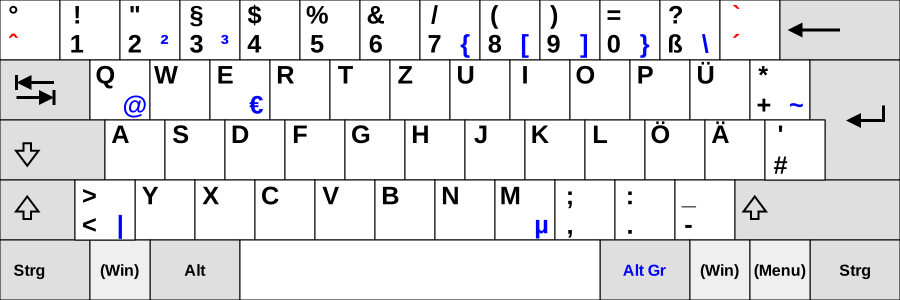
Windows 8 introduced the ability of pressing to produce ẞ (capital ß). Even though this is usually not indicated on the physical keyboard—potentially due to a lack of space, since the ß-key already has three different levels ( → "ß", → "?", and, as shown above, → "")—, it can be seen in the Windows On-Screen Keyboard by selecting the necessary keys with the German keyboard layout selected. Some newer types of German keyboards offer the assignment → capital ß.
Greece

Some of these key combinations also result in different characters if the polytonic layout is used.
Israel
Hebrew
On Hebrew keyboards, AltGr enables the user to type the Hebrew vowels and pronunciation marks. In addition, there are several combinations for special characters:
- → €
- → ₪
- → °
- → ֫
- → ֽ
- → ×
- → LRM
- → RLM
- → ־
- → –
- → ÷
- → ”
- → “
- → „
- → ’
- → ‘
- → ‚
- → ׳
- → ״
- → ׆
Yiddish
Using a Hebrew keyboard, one may write in Yiddish as the two languages share many letters. However, Yiddish has some additional digraphs not otherwise found in Hebrew, which are entered via AltGr:
- →
- →
- →
Italy
On Italian keyboards, AltGr enables the user to type the following characters:
- → €
- → €
- → @
- → #
- → [
- → ]
- → {
- → }
There is an alternate layout, which differ just in disposition of characters accessible through AltGr and includes the tilde and the curly brackets.
Latvia
The following letters can be input in the Latvian keyboard layout using AltGr:
[[Lowercase letter]]s
- → ā
- → č
- → ē
- → ģ
- → ī
- → ķ
- → ļ
- → ņ
- → ō
- → ŗ
- → š
- → ū
- → ž
[[Uppercase letter]]s
- → Ā
- → Č
- → Ē
- → Ģ
- → Ī
- → Ķ
- → Ļ
- → Ņ
- → Ō
- → Ŗ
- → Š
- → Ū
- → Ž
North Macedonia
On Macedonian keyboards, AltGr enables the user to type the following characters:
- → €
- → Ђ
- → ђ
- → [
- → ]
- → Ћ
- → ћ
- → @
- → {
- → }
- → §
Netherlands
- Digits row
- → ¹ and ¡
- → ²
- → ³
- → £ and ¤
- → €
- → ¼
- → ½
- → ¾
- → ‘
- → ’
- → ¥
- → × and ÷
- Top letters row
- → ä and Ä
- → å and Å
- → é and É
- → ®
- → þ and Þ (Icelandic and Old English thorn)
- → ü and Ü
- → ú and Ú
- → í and Í
- → ó and Ó
- → ö and Ö
- → «
- → »
- → ¬ and ¦
- Middle letters row (Home row)
- → á and Á
- → ß (German eszett aka sharp s) and §
- → ð and Ð (Icelandic eth)
- → ø and Ø
- → ¶ and °
- → ´ and ¨
- Bottom letters row
- → æ and Æ
- → © and ¢
- → ñ and Ñ
- → µ
- → ç and Ç
- → ¿
Nordic countries and Estonia, except Iceland
The keyboard layouts in the Nordic countries Denmark (DK), Faroe Islands (FO), Finland (FI), Norway (NO) and Sweden (SE) as well as in Estonia (EE) are largely similar to each other. Generally the AltGr key can be used to create the following characters:
- → @
- → £
- → $
- → €
- → µ
- → {
- → [
- → ]
- → }
- → ~ (excluding EE)
Other AltGr combinations are peculiar to just some of the countries:
- → \ (EE, FI, SE)
- {{keypress|AltGr|| (EE, FI, SE)
- {{keypress|AltGr|\ (DK, FO)
- → | (DK, FO)
- → ´ (NO)
- → ~ (FO)
- → ¨ (FO)
- → ^ (FO)
- → € (NO, DK, FO, SE, sometimes FI)
- → š (EE, sometimes FI)
- → ž (EE, sometimes FI)
- → § (EE)
- → ½ (EE)
Finnish multilingual
The Finnish multilingual keyboard standard adds many new characters to the traditional layout via the AltGr key, as shown in the image below (the blue characters can be written with the AltGr key; several dead key diacritics, shown in red, are also available as an AltGr combination).
:[[File:KB Finnish Multilingual.svg|600px|Finnish multilingual keyboard layout]]
Poland
Typewriters in Poland used a QWERTZ layout specifically designed for the Polish language with accented letters in the Polish alphabet obtainable directly. When personal computers became available worldwide in the 1980s, commercial importing into Poland was not supported by its communist government, so most machines in Poland were brought in by private individuals. Most had US keyboards, and various methods were devised to make available the accented Polish letters. An established method was to configure the rightAlt key as an AltGr key and to use it in combination with a Latin base letter to obtain the equivalent precomposed character (accented form of the letter).
- → ą
- → ć
- → ę
- → ł
- → ń
- → ó
- → ś
- → €
- → ź
- → ż (Because there are two types of "z with diacritic" ( and ), is a special case.)
At the time of the Fall of communism and opening of commercial import channels this practice was so widespread that it was adopted as the de facto standard. Nowadays nearly all PCs in Poland have standard US keyboards and use the AltGr method to enter Polish diacritics. This keyboard mapping is referred to as the Polish programmers' layout (klawiatura polska programisty) or simply Polish layout.
Another layout is still used on typewriters, mostly by professional typists. Computer keyboards with this layout are available, though difficult to find, and supported by a number of operating systems; they are known as Polish typists' layout (klawiatura polska maszynistki). Older Polish versions of Microsoft Windows used this layout, describing it as Polish layout. On current versions it is referred to as Polish (214).
Romania
The keymap with the AltGr key:
- → `
- → ~
- → ˇ
- → ^
- → ˘
- → °
- → ˛
- → `
- → ˙
- → ´
- → ˝
- → ¨
- → €
- → §
- → [
- → ]
- → \
- → ß
- → đ
- → Đ
- → ł
- → Ł
- → ;
- → '
- → ©
- the signs mostly pressed with prints the US keyboard signs â ß € r ț y u î o § „ ” ă ș đ f g h j k ł ; z x © v b n m « »
Russia
Since release 1903, versions of Windows 10 have the binding:
- → ₽ (Ruble sign)
South Slavic Latin and Czech keyboards
On South Slavic Latin (used in Croatia, Slovenia, Bosnia and Herzegovina, Montenegro and Serbia) and on Czech keyboards, the following letters and special characters are created using AltGr:
- → \
- → |
- → €
- → ÷
- → ×
- → [
- → ]
- → ł
- → Ł
- → ß
- → ¤
- → @
- → {
- → }
- → §
- →
- →
- → ~
- → ˇ
- → ^
- → ˘
- → °
- → ˛
- → `
- → ˙
- → ´
- → ˝
- → ¨
- → ¸
:[[File:Qwertz-si.svg|600px|Slovenian/Croatian/Serbian (Latin) keyboard layout]]
South Slavic cyrillic keyboards use a different layout.
Spain
- → \
- → |
- → @
- → #
- → ~
- → ¬
- → €
Switzerland
On Swiss keyboards, AltGr in combination with the following keys types the following characters:
- → ¦
- → @
- → #
- → °
- → §
- → ¬
- → |
- → ¢
- {{keypress|AltGr|\
- → €
- → ´ (dead key)
- → ~ (dead key)
- / → [ (See explanation below)
- → ]
- / → { (See explanation below)
- → }
Switzerland has four national Languages (German, French, Italian, and Romansh). The Swiss keyboard layout is therefore designed with compatibility in mind for all four languages. In German-speaking and Romansh-speaking Switzerland (as well as the Czech Republic), the Swiss German layout is used, while in the French-speaking and Italian-speaking Switzerland, the Swiss French layout is used. The two layouts only differ on three keys—OEM1, OEM5, and OEM7. On the Swiss German layout, these three keys are labelled , , and , respectively, while on the Swiss French layout, the labels are inverted as , , and ; namely, the base layer and the layer are swapped. However, with respect to the layer, the region-specific layouts are irrelevant.
Swiss German: → {
Swiss French: → {
Turkey
In Turkish keyboard variants the AltGr can be used to display the following characters:
- → æ
- → ß
- → €
- → ₺
- → @
- → i
- a → ã
- a → ä
- a → á
- a → à
Ukraine
In Ukrainian (enhanced) keyboard, added in Windows Vista, combination (or as it is written in Cyrillic keyboards gives letter ґ and Ґ.
United Kingdom and Ireland
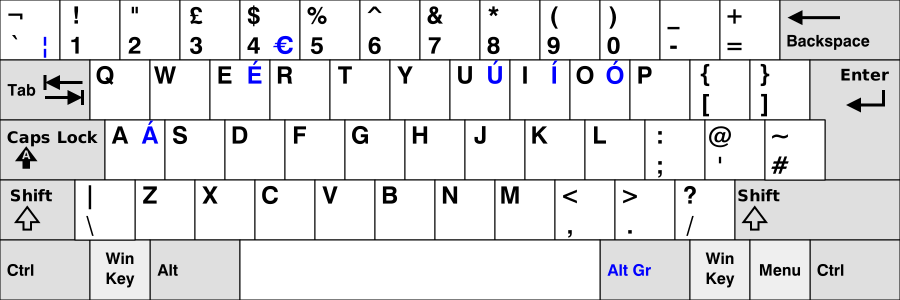
- → á and Á
- → é and É
- → í and Í
- → ó and Ó
- → ú and Ú
- → €
- → \
- → ¦
In UK and Ireland keyboard layouts, only two alternative use symbols are printed on most keyboards, which require the AltGr key to function. These are:
- € the euro sign. Located on the "4/$" key.
- ¦ the broken bar symbol. Located on the "`/¬" key, to the immediate left of "1".
Using the AltGr key on Linux produces many other characters and symbols, e.g. ¹²³€½{[]}@łe¶ŧ←↓→øþæßðđŋħjĸł«»¢“”nµΩŁE®Ŧ¥↑ıØÞƧЪŊĦJ&Ł©‘’Nº×÷· (If reconfigured as a compose key, an even larger repertoire is available).
With the UK extended keyboard setting (below), ChromeOS offers a large repertoire of symbols and precomposed characters.
Scotland and Wales
For the diacritics used by Welsh (ŵ and ŷ) and Scottish Gaelic (à, è, ì, ò and ù), the UK extended keyboard setting is needed. This makes available (for circumflex accent) and (for grave accent) as dead keys.
UK extended keyboard layout
The UK-Extended keyboard mapping (available with Microsoft Windows, Linux and ChromeOS) allows many characters with diacritical marks (including those used in other European countries) to be generated by using the AltGr key, dead keys or a compose key, in combination with others.
| shift | |||
|---|---|---|---|
| \ | Z {{green | X | |
| x | C | ||
| c | V | ||
| v | B | ||
| b | N | ||
| n | M | ||
| m | |||
| , | |||
| . | ? | ||
| / |
Notes: Dotted circle (◌) is used here to indicate a dead key, invoked using AltGr. The (grave accent) key is the only one that acts as a free-standing dead key and thus does not respond as shown on the key-cap. (For a complete list of the characters generated using dead keys, see QWERTY#ChromeOS.)
(°) is a degree sign; (º) is a masculine ordinal indicator. is an em-dash; there is no provision for en-dash.
United States
Most keyboards sold in the US do not have an (engraved) key. However, if there is a right-hand key it will act as if a layout using it is installed (conversely a foreign keyboard will act like the right-hand if the standard US keyboard layout is installed).
US-International
Microsoft provides a US-International keyboard layout that uses (or right-hand or ) key to produce more characters: :[[File:KB US-International.svg|600px|US-International keyboard layout]] Red characters are dead keys; for example ä can be entered with .
Other operating systems such as Linux and ChromeOS follow this layout but increase the repertoire of glyphs provided.
X Window System
In the X Window System (Linux, BSD, Unix), AltGr can often be used to produce additional characters with almost every key on the keyboard. Furthermore, with some keys, AltGr will produce a dead key; for example on a UK keyboard, semicolon can be used to add an acute accent to a base letter, and left square bracket can be used to add a trema:
- followed by → é
- followed by → Ö
This use of dead keys enables one to type a wide variety of precomposed characters that combine various diacritics with either uppercase or lowercase letters, achieving a similar effect to the Compose key.
Keyboard maps
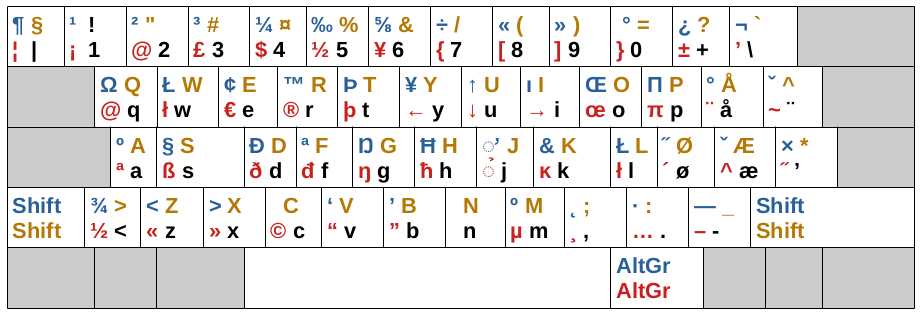
Below are some diagrams and examples of country-specific key maps. For the diagrams, the grey symbols are the standard characters, yellow is with , red is with , and blue is with .
Danish keyboard
The Danish keymap features the following key combinations:
- → Ω
- → œ
- → µ
Italian keyboard
The Italian keymap includes, among other combinations, the following:
- → ħ
- → ~
- → `
- → ×
Norwegian keyboard
Polish keyboard
The Polish keymap on X-based systems features changed combination for € sign:
- → € results in ↓ instead. It also introduces several symbols and characters from different languages, including among others:
- → ß
- → þ
- → ð
- → π
- → Ω
- → µ
- → ∞
- → æ
- → œ
Swedish keyboard

Notes
References
References
- (10 January 2024). "What is AltGr key?".
- Microsoft Support. "How to use the United States-International keyboard layout in Windows 7, in Windows Vista, and in Windows XP". Microsoft.
- (September 2010). "AIX® Version 6.1 Keyboard Technical Reference".
- Raymond Chen. (29 March 2004). "Why Ctrl+Alt shouldn't be used as a shortcut modifier". Microsoft.
- (2006-06-20). "Suomalainen monikielinen näppäimistökaavio, viimeiseksi tarkoitettu luonnos".
- Kaplan, Michael S.: [http://www.siao2.com/2004/12/28/333168.aspx "To start press the ALTGR key." Hmm... where's the ALTGR key?]. 28 December 2004.
- link. (27 July 2011 . A bi-lingual (Finnish + English) presentation page collecting drafts of the Finnish Multilingual Keyboard. [[CSC – IT Center for Science Ltd]]. Page updated 28 December 2006.)
- [https://archive.today/20120715114449/http://sales.sfs.fi/servlets/ProductServlet?action=showproduct&productid=210467 SFS 5966] Keyboard layout. Finnish-Swedish multilingual keyboard setting. Finnish Standards Association SFS. 3 November 2008.
This article was imported from Wikipedia and is available under the Creative Commons Attribution-ShareAlike 4.0 License. Content has been adapted to SurfDoc format. Original contributors can be found on the article history page.
Ask Mako anything about AltGr key — get instant answers, deeper analysis, and related topics.
Research with MakoFree with your Surf account
Create a free account to save articles, ask Mako questions, and organize your research.
Sign up freeThis content may have been generated or modified by AI. CloudSurf Software LLC is not responsible for the accuracy, completeness, or reliability of AI-generated content. Always verify important information from primary sources.
Report