Panel (computer software)
title: "Panel (computer software)" type: doc version: 1 created: 2026-02-28 author: "Wikipedia contributors" status: active scope: public tags: ["graphical-control-elements"] topic_path: "general/graphical-control-elements" source: "https://en.wikipedia.org/wiki/Panel_(computer_software)" license: "CC BY-SA 4.0" wikipedia_page_id: 0 wikipedia_revision_id: 0
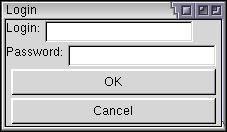
::figure[src="https://upload.wikimedia.org/wikipedia/commons/f/fe/Boxes-ex2.jpg" caption="XUL Example"] ::
A panel is "a particular arrangement of information grouped together for presentation to users in a window or pop-up". In ISPF, a panel is "a predefined display image that you see on a display screen". In modern multiple-document interface software a panel refers to a particular arrangement of information grouped together and presented to users docked (by default) in the user interface rather than floating in a window, pop-up or dialog box.
A panel graphical control element is commonly packaged as part of a widget toolkit (libraries that contain a collection of graphical control elements) for a graphical user interface. See toolbar and dialog box.
References
References
- IBM Corporation. (1992). "CUA Basic Interface Design Guide".
- IBM Corporation. (2011). "Interactive System Productivity Facility (ISPF) User's Guide Volume I".
::callout[type=info title="Wikipedia Source"] This article was imported from Wikipedia and is available under the Creative Commons Attribution-ShareAlike 4.0 License. Content has been adapted to SurfDoc format. Original contributors can be found on the article history page. ::