Conky (software)
System monitor for the X Window System
title: "Conky (software)" type: doc version: 1 created: 2026-02-28 author: "Wikipedia contributors" status: active scope: public tags: ["free-system-software", "free-software-programmed-in-c", "linux-process--and-task-management-related-software", "system-administration", "lua-(programming-language)-scriptable-software", "system-monitors", "software-using-the-gnu-general-public-license"] description: "System monitor for the X Window System" topic_path: "technology/operating-systems" source: "https://en.wikipedia.org/wiki/Conky_(software)" license: "CC BY-SA 4.0" wikipedia_page_id: 0 wikipedia_revision_id: 0
::summary System monitor for the X Window System ::
::data[format=table title="Infobox software"]
| Field | Value |
|---|---|
| name | Conky |
| logo | |
| screenshot | Conky-unix-program-screen-shot.png |
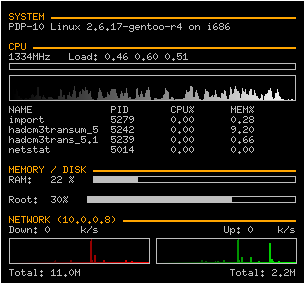
| caption | A typical Conky appearance |
| author | Brenden Matthews |
| latest release version | |
| latest release date | |
| programming language | C, C++ |
| operating system | Linux, FreeBSD, and OpenBSD |
| genre | System monitor |
| license | GPL and BSD licenses |
| website | |
| :: |
| name = Conky | logo = | screenshot = Conky-unix-program-screen-shot.png | caption = A typical Conky appearance | author = Brenden Matthews | developer = | released = | latest release version = | latest release date = | programming language = C, C++ | operating system = Linux, FreeBSD, and OpenBSD | genre = System monitor | license = GPL and BSD licenses | website = Conky is a free software desktop system monitor for the X Window System. It is available for Linux, FreeBSD, and OpenBSD. Conky is highly configurable and is able to monitor many system variables including the status of the CPU, memory, swap space, disk storage, temperatures, processes, network interfaces, battery power, system messages, e-mail inboxes, Arch Linux updates, many popular music players (MPD, XMMS2, BMPx, Audacious, etc.), weather updates, breaking news, and much more. Unlike system monitors that use high-level widget toolkits to render their information, Conky is drawn directly in an X window. This allows it to be configured such that it consumes relatively few system resources.
Conky was hailed as "one of the best maintained, and definitely one of the most useful, programs in the world of open source" in Linux Magazine.
It comes pre-configured in the default installation of Pinguy OS and CrunchBang Linux.
History
Conky is a fork of torsmo, a system monitor that is no longer maintained. Torsmo, however, continues to be used in systems where applications that use minimal resources are preferred. Damn Small Linux, for example, runs torsmo in its desktop root window on the default installation of its Live CD. Conky derives its name from a character in the Canadian television programme Trailer Park Boys.
Common uses
While Conky is suited for use as a system monitor, it can also be used to gather and display many other sources of information and can be extended with the Lua programming language.
Conky has also been ported to devices such as the Nokia N900 and can be ported to practically any system with GCC and an X11 implementation.
Users have created and distributed many customized scripts, demonstrating Conky's modularity and versatility in function and appearance. A thread on the Ubuntu forums has grown to over 2,000 pages of users sharing their configurations.
Usage example
A simple configuration for Conky which displays the time on a user's desktop is as follows:
Note: As of version 1.10 Conky has changed the syntax used.
conky.config = { alignment = 'middle_middle', background = false, border_width = 1, cpu_avg_samples = 2, default_color = 'white', default_outline_color = 'white', default_shade_color = 'white', draw_borders = false, draw_graph_borders = true, draw_outline = false, draw_shades = false, use_xft = true, font = 'Free Mono:size=30', gap_x = 5, gap_y = 60, minimum_height = 5, minimum_width = 400, net_avg_samples = 2, no_buffers = true, out_to_console = false, out_to_stderr = false, extra_newline = false, own_window = true, own_window_class = 'Conky', own_window_type = 'desktop', stippled_borders = 0, update_interval = 1.0, uppercase = false, use_spacer = 'none', show_graph_scale = false, show_graph_range = false }
conky.text = [[ ${time %H:%M} ]]
A simpler example of the old syntax: update_interval 30
own_window yes own_window_type desktop
use_xft yes xftfont DejaVu Sans:size=14
alignment bottom_right
TEXT ${time %H:%M}
Default configuration file location is or . On most systems, "" is , and you can find the sample configuration file there ().
Screenshots
Image:Arch Linux.png|Conky on Arch Linux Image:Conky_Orange.png|Conky on Ubuntu Image:ConkyF14.png|Conky on Fedora 14 (Laughlin) Image:Conky-grapes on Debian.jpg|Conky with lua on Debian
References
References
- [https://raw.githubusercontent.com/brndnmtthws/conky/master/COPYING Conky's license info]
- [https://github.com/brndnmtthws/conky Conky homepage]
- [http://www.linux.com/feature/136147 Expert's guide to configuring Conky] {{Webarchive. link. (2009-02-03 by Dmitri Popov on [[Linux.com]])
- [http://debaday.debian.net/2007/09/02/conky-highly-configurable-system-monitor-for-x/ Conky: highly configurable system monitor for X] by Casey Stamper on Debian.net
- [http://blog.kickino.org/archives/2006/09/25/T23_09_45/ GKrellM vs. Conky] {{Webarchive. link. (2008-12-02 by Sebastian Wieseler)
- [https://conky.sourceforge.net/docs.html Conky documentation]
- [http://www.linux.com/articles/56931 CLI Magic: Lightweight Conky is a system monitor powerhouse] {{Webarchive. link. (2008-11-07 by Shashank Sharma on [[Linux.com]])
- Rähm, Jan. (March 2009). "Vital Signs: Monitoring your system with Conky". [[Linux Magazine]].
- {{usurped
- "About CrunchBang Linux [CrunchBang Linux Wiki]".
- [https://github.com/brndnmtthws/conky/wiki/FAQ Conky FAQ]
- [http://www.damnsmalllinux.org/notes.html Changelog of Damn Small Linux]
- [https://github.com/brndnmtthws/conky/wiki/What-Is-Conky%3F What is Conky?]
- [https://maemo.org/downloads/product/Maemo5/conky/ Nokia N900 Conky package]
- [http://ubuntuforums.org/showthread.php?p=1645914 Post your .conkyrc files w/ screenshots]
- [http://gnome-look.org/content/show.php/Conky+scripts?content=52896 Conky scripts]
- [http://ubuntuforums.org/showthread.php?p=4219577 Conky Gmail Revisited]
- [http://ubuntuforums.org/showthread.php?p=1194508 Howto: Get a beautiful Conky 1.4.2 setup]
::callout[type=info title="Wikipedia Source"] This article was imported from Wikipedia and is available under the Creative Commons Attribution-ShareAlike 4.0 License. Content has been adapted to SurfDoc format. Original contributors can be found on the article history page. ::